WorkOS FGA vs SqlOS SHRBAC
WorkOS FGA and SqlOS both use hierarchical RBAC ideas. The difference is whether resource authorization lives in WorkOS or in your SQL Server database.
By Ross Slaney
WorkOS FGA is the closest mental-model comparison to SqlOS SHRBAC (scoped hierarchical RBAC).
It is not a pure graph DSL like Auth0 FGA. WorkOS describes FGA as hierarchical, resource-scoped access control that extends its existing RBAC system. Resources are arranged in a hierarchy and permissions flow down that hierarchy. The official docs are worth reading before making this decision: WorkOS FGA overview, resources, and resource discovery.
SqlOS agrees with that mental model. The difference is the data boundary.
Same hierarchy shape, different data boundary
WorkOS FGA is an external authorization API with resource instances registered in WorkOS. SqlOS uses the same hierarchy idea but keeps resource rows local to your database.
WorkOS FGA
- Resource types in dashboard
- Register resource instances
- Authorization API checks
Shared model
- Org -> workspace -> project
- Roles scoped to resources
- Permissions inherit downward
SqlOS
- Resource table in SQL Server
- EF query filters for lists
- FGA dashboard in your app
The short version
| Question | WorkOS FGA | SqlOS SHRBAC |
|---|---|---|
| Resource instances | Registered through WorkOS API | Created by your app or FGA admin in SQL Server |
| Resource hierarchy | WorkOS-managed hierarchy | SqlOS resource table in your database |
| List filtering | Authorization checks and discovery plus app query logic | ToPageAsync on the EF query, one page at a time |
| Mental model | RBAC + hierarchy | RBAC + hierarchy |
| Auth coupling | AuthKit, SSO, Directory Sync, organization-scoped IdP role assignment | SqlOS AuthServer in the same host |
| High-volume rows | Usually stay in your DB with parent references | Can be modeled as resources when list filtering needs it |
| Cost | SaaS pricing | MIT license plus your infrastructure |
The comparison is not "hierarchy vs no hierarchy." Both have hierarchy. The comparison is "external authorization API vs SQL Server-native authorization rows."
What WorkOS FGA gives you
WorkOS FGA keeps the RBAC vocabulary: roles, permissions, assignments. It adds resource types and resource instances so roles can be assigned at a specific level of your product hierarchy.
The WorkOS docs use examples like organization -> workspace -> project. In that model, a workspace admin can inherit permissions over projects inside the workspace. WorkOS also documents sub-50ms p95 access checks, strong consistency for role changes, and integration with AuthKit, SSO, Directory Sync, and organization-scoped IdP role assignment.
That is compelling if you want to outsource both identity and authorization API operations.
Creating a WorkOS FGA resource is an API operation:
curl https://api.workos.com/authorization/resources \
  -X POST \
  -H "Authorization: Bearer $WORKOS_API_KEY" \
  -H "Content-Type: application/json" \
  -d '{
    "resource_type_slug": "project",
    "external_id": "project_02H",
    "organization_id": "org_01HXYZ",
    "parent_resource_type_slug": "workspace",
    "parent_resource_external_id": "workspace_01H",
    "name": "API Backend"
  }'
Then checks go through the Authorization API:
curl https://api.workos.com/authorization/organization_memberships/om_01HXYZ/check \
  -X POST \
  -H "Authorization: Bearer $WORKOS_API_KEY" \
  -H "Content-Type: application/json" \
  -d '{
    "permission_slug": "project:edit",
    "resource_type_slug": "project",
    "resource_external_id": "project_02H"
  }'
That is a clean, managed boundary.
The sync question
WorkOS is explicit that resources should mirror your application's data. When entities are created, updated, deleted, or reparented in your app, the corresponding WorkOS resources should change too.
That is reasonable for structural resources:
- workspaces
- projects
- repositories
- environments
- dashboards
It is less attractive for high-volume rows:
- documents
- messages
- tasks
- comments
- individual records in a list view
WorkOS documentation recommends keeping very high-cardinality content in your database with a reference to a parent FGA resource. That avoids syncing millions of leaf records, but it means the authorization decision is often about the parent, while the actual rows still live in your database.
SqlOS takes the opposite default for a SQL Server app. Resources are database rows, so a protected domain row can describe its resource and SqlOSDbContext<TContext> syncs the backing SqlOSFgaResource during the app write:
var projectId = Guid.NewGuid();
var project = new Project
{
    Id = projectId,
    WorkspaceId = workspace.Id,
    WorkspaceResourceId = workspace.ResourceId,
    ResourceId = $"project::{projectId:D}",
    Name = request.Name
};

// Project implements ISqlOSResourceEntity:
// ResourceTypeId => "project"
// ParentResourceId => WorkspaceResourceId
// ResourceName => Name

dbContext.Projects.Add(project);
await dbContext.SaveChangesAsync(cancellationToken);
There is no vendor sync API for the resource instance because the resource instance is already in your database.
List filtering is the practical fork
WorkOS FGA answers checks and provides discovery endpoints. Those are useful for member lists, sharing dialogs, scoped navigation, and point authorization.
SqlOS focuses heavily on authorized EF list pages:
var page = await dbContext.Projects
    .Where(x => x.WorkspaceId == workspaceId)
    .OrderBy(x => x.Name)
    .ToPageAsync(subjectId, "PROJECT_VIEW", pageSize: 25, cursor, cancellationToken);
The query stays your EF query. Product filtering, sorting, the authorization check, and pagination all run in SQL Server, and page.NextCursor continues the list. Index the order, entity.HasIndex(x => new { x.Name, x.Id }), and a caller who can see a few projects in a large table still costs about a page: SqlOS keeps a copy of every index under every node of the resource tree.
That page is the whole list API. SqlOS has no discovery-style unpaged list of what a caller can access and no authorized count, because both cost every row the caller can see. A single project is a point check with CheckAccessAsync.
If your app has many list pages and those pages are backed by EF Core over SQL Server, this is not a small implementation detail. It determines where your authorization complexity lives.
Dashboard and support workflow
WorkOS gives you a vendor dashboard and APIs. That is useful when your support and IT workflows already live around WorkOS organizations, SSO, and Directory Sync.
SqlOS gives you an in-app dashboard:
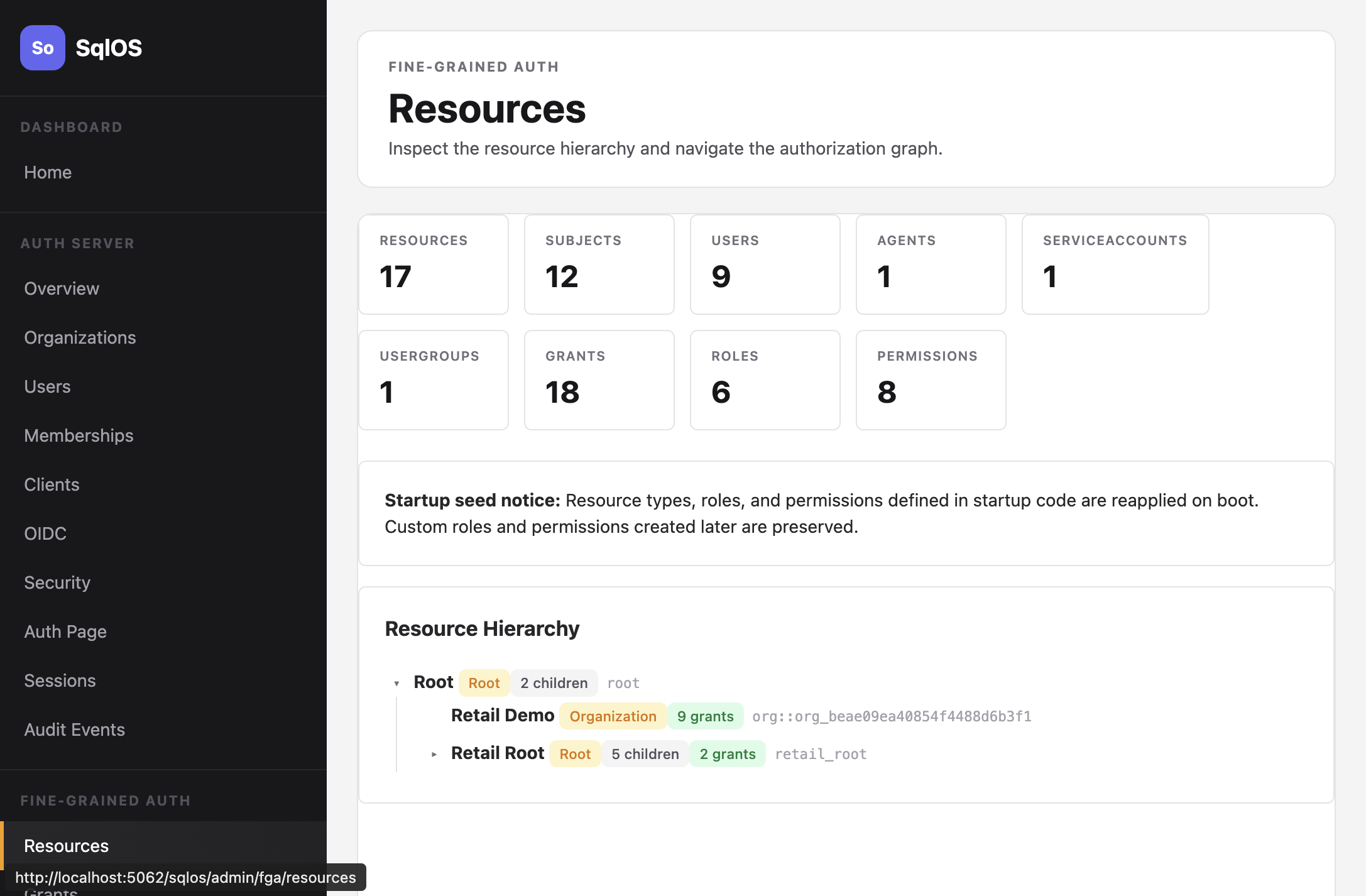
That is useful when support needs to debug a customer row in the same environment where the data exists. The operator can inspect the app row, the resource row, the grant, and the access trace without leaving the deployment.
Decision scenarios
Choose WorkOS FGA when:
- you want AuthKit, SSO, Directory Sync, Admin Portal, and FGA from one SaaS provider
- your top-level authorization model is organization, workspace, project, and similar structural resources
- you are comfortable registering resource instances with WorkOS
- you want documented sub-50ms p95 managed access checks and vendor operations
- IdP group to organization role mapping matters today
Choose SqlOS when:
- you are a SQL Server shop building one .NET product
- you want auth and FGA data colocated with app data
- authorized EF list pages matter more than an external Authorization API
- you do not want to sync every app-created resource to a vendor
- you want MIT-licensed infrastructure under your deployment boundary
The honest single-app answer
WorkOS FGA and SqlOS SHRBAC are philosophically closer than Auth0 FGA and SqlOS. Both treat hierarchy as first-class. Both avoid role explosion by letting permissions flow down a tree.
The difference is ownership. WorkOS owns the authorization API and resource registry. SqlOS lets your app own the authorization rows.
For many teams, outsourcing that is the point. For a .NET team already committed to SQL Server, colocating it may be the simpler long-term choice.
Next reading: