Sessions and Tokens
Access tokens, refresh tokens, validation, and session lifecycle.
Each login creates an OAuth session (access token plus refresh token) and, for a hosted or headless browser flow (including system-browser and device-approval sign-in for mobile, desktop, and CLI clients), a separate issuer session. Clearing the tokens does not end the issuer session. See Refresh and Logout.
The issuer session is the cookie-backed sign-in at the SqlOS issuer itself: the sqlos_auth_page cookie on the identity host that /authorize consults to decide whether this browser is already signed in. It is what makes first-party silent reuse, prompt=none, max_age, login_required, and headless /device approval possible. Hosted AuthPage and headless custom UIs establish and read the same issuer session; only the login UI differs. It is distinct from the per-client OAuth access/refresh session your application holds. Issuer session cookies that belong to the same logical session share a revocation lifetime: logout invalidates the current cookie and any superseded predecessor from silent renewal. A cookie that was revoked or no longer exists counts as signed out, and signing in again replaces it.
After login, you receive:
{
  "accessToken": "eyJhbG...",
  "refreshToken": "rt_a1b2c3d4...",
  "sessionId": "ses_443b577029cb43139d119ab6",
  "clientId": "my-web-app",
  "organizationId": "org_beae09ea40854f4488d6b3f1",
  "accessTokenExpiresAt": "2026-03-19T14:30:00Z",
  "refreshTokenExpiresAt": "2026-03-26T13:30:00Z"
}
Access tokens are RS256-signed JWTs containing user, session, client, and organization claims. Validate them server-side:
var expectedAudience = "https://api.example.com";
var validated = await authService.ValidateAccessTokenAsync(rawToken, expectedAudience, ct);

if (validated == null)
    return Results.Unauthorized();

var userId = validated.UserId;
var sessionId = validated.SessionId;
var orgId = validated.OrganizationId;| Field | Description |
|---|---|
UserId | Authenticated user |
SessionId | Persisted session referenced by the token |
ClientId | OAuth client that initiated login |
OrganizationId | Scoped organization (nullable) |
Principal | ClaimsPrincipal with all JWT claims |
External services can validate SqlOS-issued JWTs using the public key at:
GET /sqlos/auth/.well-known/jwks.jsonJWKS publishes the active public key and any retired public keys still inside the configured rotation grace window. Tokens require an exact RS256 algorithm, JWT type, and matching kid; resource servers should refresh JWKS when rotation introduces an unknown kid.
Private signing material is never returned by this endpoint or stored as plaintext in the application database.
JWKS-only validation cannot see the persisted SqlOS session. It accepts a signed, correctly issued token until its JWT expiry even if the session was logged out in the meantime. Use the SDK/middleware validator—or an application-owned trusted introspection/session check—when immediate revocation is required.
Refresh tokens are opaque and rotated on successful refresh. Each refresh consumes the old token and issues a new pair. A public client's OAuth /token refresh is identified by that token; client_id is optional. Confidential clients still present client_secret_basic. Sessions record the scope granted at authorization time and the moment the user actually authenticated (AuthenticatedAt, preserved across silent SSO reuse), so OAuth refresh responses echo the original grant and max_age decisions stay truthful. See Refresh and Logout.
var tokens = await authService.RefreshAsync(
    new SqlOSRefreshRequest(refreshToken, OrganizationId: null), ct);
Grace and replay detection: The default 30-second refresh grace returns the same cached access token plus a fresh sibling refresh token in the same family and with the same expiry for a near-concurrent retry. Reuse outside the configured grace behavior revokes the entire token family and the session. Set RefreshTokenGraceWindowSeconds deliberately for your client concurrency model.
By default, SqlOS allows a 30-second retry grace window for near-simultaneous refreshes from multiple tabs, SSR calls, or app instances. The first request performs the only rotation. Every accepted retry of that consumed token receives the byte-for-byte same access token and refresh token, so the family always remains one linear lineage:
R0 (consumed) -> R1 (the only active replacement)SqlOS never creates a sibling R2 for a retry of R0. If R1 has already advanced, an older retry can only converge through the same stored lineage; it cannot create another active branch. Outside the grace window, reuse revokes the family and session.
The short-lived response cache is purpose-bound and encrypted automatically, and its ciphertext is cryptographically unusable after the grace window. Consumed token hashes remain until normal expiry so later reuse can still identify and revoke the family. Production deployments with multiple replicas or ephemeral storage should follow the Data Protection guidance in Production Readiness.
Set RefreshTokenGraceWindowSeconds to 0 when immediate replay detection is preferred over concurrent-retry tolerance.
Organization switching: Pass a different organizationId during refresh to switch the token's org scope without re-authenticating. SqlOS requires an active user, active target organization, and active membership before it mints the replacement token. When organizationId is omitted, SqlOS applies the same checks to the organization already stored on the session; omission never bypasses membership validation. Grace-window retries also revalidate the organization of the cached replacement token before returning it.
SqlOS treats the database lifecycle state as part of authentication, not only as dashboard metadata. The following boundaries require the user to remain active. When an organization is present, the organization and the user's membership must also remain active:
Lifecycle failures are returned as generic authentication or invalid_grant failures. The audit log records auth.lifecycle.denied with the internal boundary and reason (user_inactive, organization_inactive, or membership_inactive) without exposing that detail to the browser or OAuth client.
Stateful access-token validation checks both the absolute and idle session deadlines. Successful validation records activity and slides the idle deadline, capped by the absolute session deadline.
Device Authorization Grant issues the same access and refresh token shape as hosted AuthPage and headless browser flows. The only difference is the token endpoint grant:
grant_type=urn:ietf:params:oauth:grant-type:device_code
client_id=acme-cli
device_code=opaque-device-code
resource=https://api.acme.com
Until the browser user approves the CLI request, /sqlos/auth/token returns authorization_pending. After approval it returns the normal OAuth token response and consumes the device code exactly once. See CLI OAuth.
Revoke a session by refresh token or session ID:
await authService.LogoutAsync(refreshToken: "rt_...", sessionId: null, ct);Revoke all sessions for a user:
await authService.LogoutAllAsync(userId, ct);GET /sqlos/auth/logout ends one logical issuer session, including superseded cookies from renewal. LogoutAllAsync invalidates every issuer session for the user as well as OAuth sessions and refresh-token families. A successful password reset does the same. Organization deactivation invalidates organization-bound OAuth and issuer sessions and revokes organization-owned calendar connections, and the SSO portal's organization-session revocation action invalidates matching-domain issuer sessions along with OAuth sessions. Logout-all and password reset are sign-out operations: they leave calendar connections in place, whereas user or organization deactivation revokes them. Already-issued issuer session cookies that predate session families are consumed when that schema is applied. A revoked cookie never signs the browser in silently again, but it does not block a fresh sign-in either: /authorize deletes it and shows the sign-in page, and a password, one-time code, magic link, SSO, or signup completion starts a new issuer session in place of it.
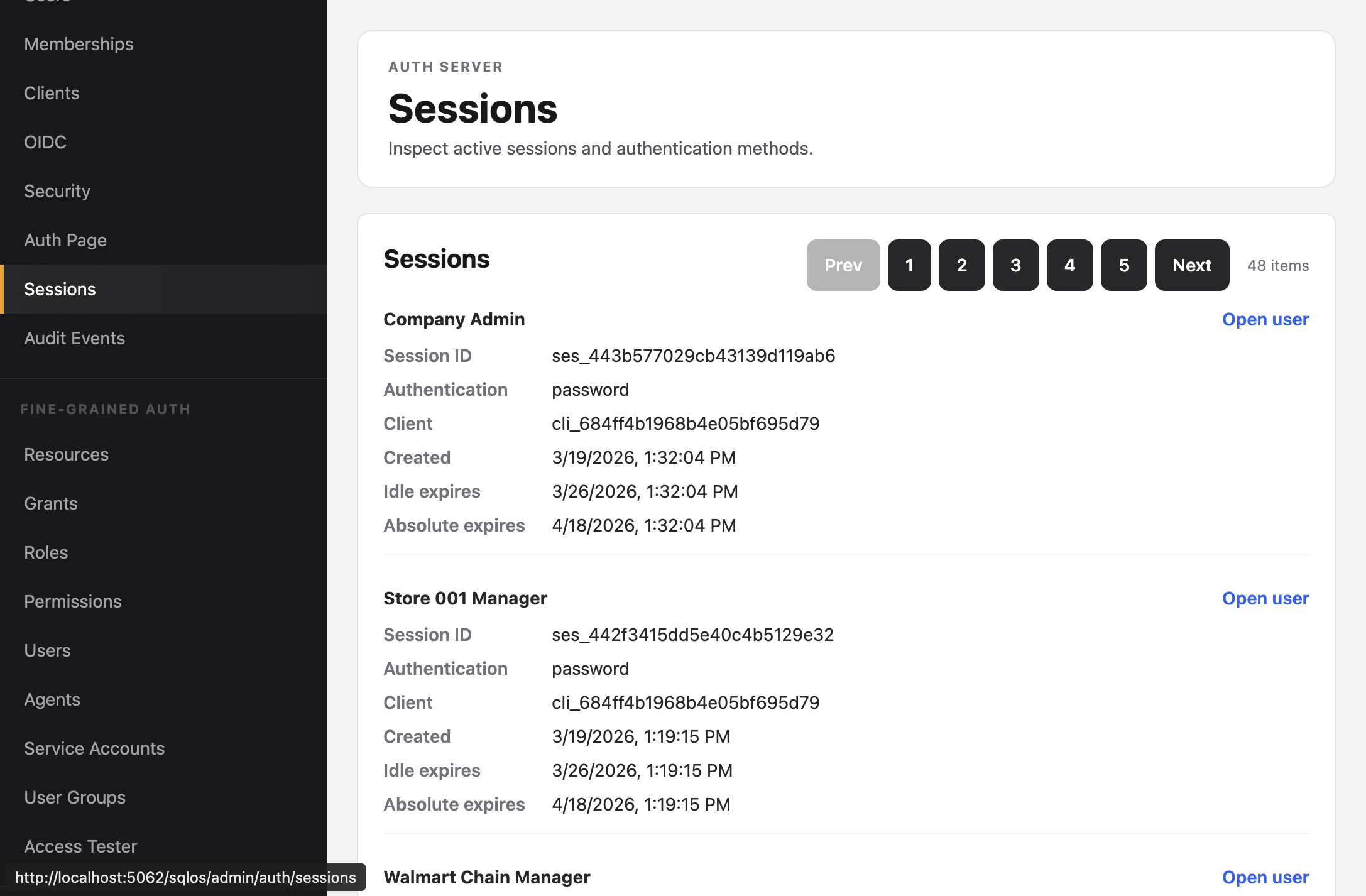
The dashboard's Auth Server > Sessions page supports incident-response revocation by session, user, organization, client application, or an AND-combination of those filters. It always previews the matched sessions and active refresh tokens before asking for confirmation. The Applications page uses the same preview-and-confirm workflow when an operator revokes a client's sessions.
Trusted backend administration can use the same strongly typed service:
var preview = await revocations.PreviewAsync(new SqlOSAdminSessionRevocationRequest(
    OrganizationId: organizationId,
    ClientApplicationId: clientApplicationId,
    Reason: "incident-2026-07"), ct);

var result = await revocations.RevokeAsync(new SqlOSAdminSessionRevocationRequest(
    OrganizationId: organizationId,
    ClientApplicationId: clientApplicationId,
    Reason: "incident-2026-07",
    OperationId: preview.OperationId,
    Confirm: true,
    ExpectedMatchedSessions: preview.MatchedSessions), ct);
The authenticated admin API exposes POST /sqlos/admin/auth/api/sessions/revocation/preview and POST /sqlos/admin/auth/api/sessions/revocation. At least one selector is required, multiple selectors narrow the result, and execution requires confirm: true. Broad execution also requires expectedMatchedSessions from the preview; if the scope changes between preview and confirmation, the caller must preview again. A single operation is capped at 10,000 sessions; narrow broader incident queries instead of loading an unbounded tenant history. Revocation immediately marks matching sessions and active refresh tokens as revoked, removes cached refresh responses, preserves unrelated sessions, and writes an audit record containing the actor, reason, selectors, operation ID, and counts—never token material. Reusing an operation ID with a different scope or reason is rejected.
Repeat execution is safe: already-revoked sessions and tokens are counted but not rewritten. On SQL Server, matching execution is serialized so concurrent incident responders cannot count the same active sessions as newly revoked.
Configured via the dashboard (Auth Server > Security) or the admin API:
| Setting | Description |
|---|---|
| Refresh token lifetime | How long a refresh token is valid |
| Session idle timeout | Refresh is rejected when no successful refresh has extended the session within this period |
| Session absolute lifetime | Hard expiration regardless of activity |
{
  "refreshTokenLifetimeMinutes": 10080,
  "sessionIdleTimeoutMinutes": 1440,
  "sessionAbsoluteLifetimeMinutes": 43200
}
The access token lifetime is configured separately in startup:
builder.AddSqlOS<AppDbContext>(options =>
{
    options.AuthServer.AccessTokenLifetime = TimeSpan.FromMinutes(15);
});
Idle timeout does not retroactively shorten a JWT that has already been issued. Session-aware access-token validation rejects a missing, revoked, or absolutely expired session; the access token's own exp remains its time boundary. Idle expiry is enforced on refresh, and a successful refresh extends the idle deadline without moving the absolute deadline.
The dashboard Sessions page shows session history with authentication method, client, expiration, revocation time, and revocation reason. Use its user, organization, and client filters to preview and revoke a bounded set during incident response.