Add sign-in to a terminal app
Authenticate a CLI with browser-based device authorization, refresh tokens, and a resource-bound API token.
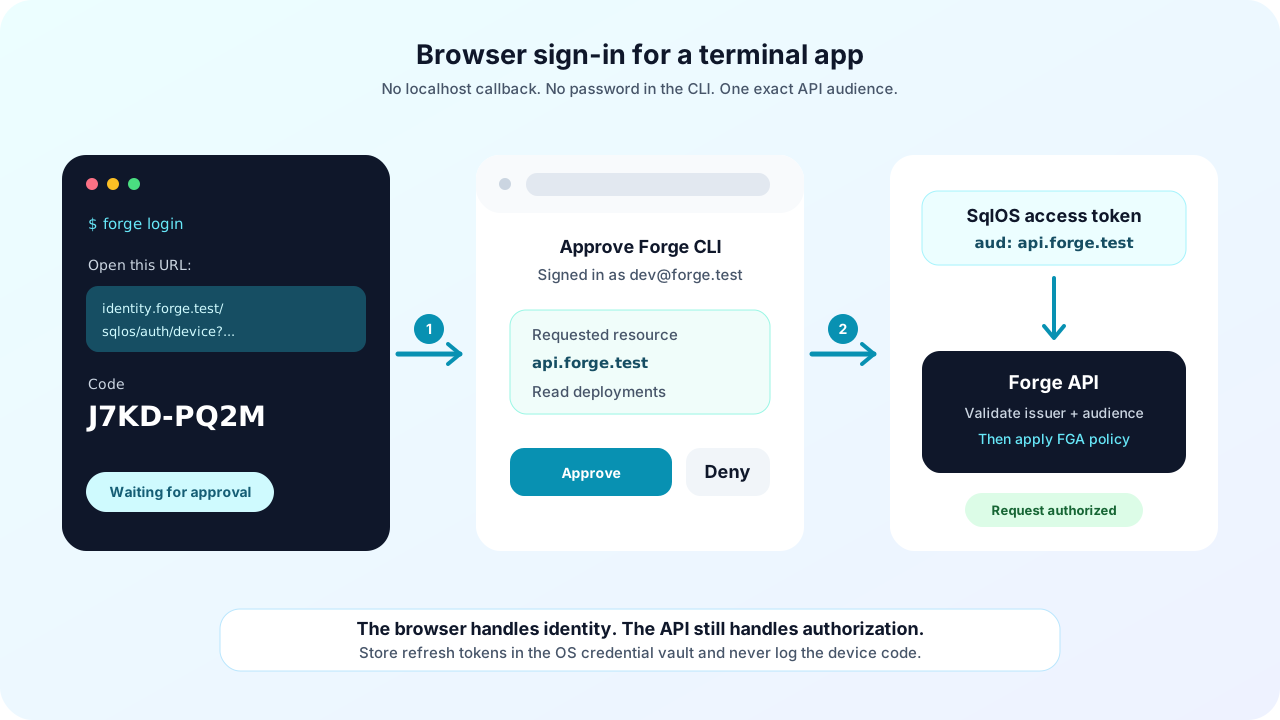
This guide adds sign-in to Forge, a fictional .NET CLI for a deployment API at https://api.forge.test. Forge prints a short browser URL and user code, the operator signs in through SqlOS, and the CLI receives an access token without opening a localhost listener or collecting a password.
Device Authorization Grant is a good fit for CLIs, SSH sessions, and machines where a callback listener is unreliable. If your desktop app already owns a secure loopback or claimed HTTPS callback, use authorization code with PKCE instead.
Forge CLI
  ├─ discover SqlOS device and token endpoints
  ├─ request a device code for https://api.forge.test
  ├─ print verification_uri_complete and the short user_code
  ├─ poll the token endpoint at the server-provided interval
  ├─ store the refresh token in the operating-system credential vault
  └─ call the Forge API with a resource-bound bearer token

Browser
  └─ sign in and approve Forge through the existing SqlOS AuthPage
The terminal never receives the user's password. The browser completes the same password, Email OTP, social, SSO, MFA, and organization-selection policies already configured for the SqlOS host.
AddSqlOS, which maps the auth endpoints at startup.For a runnable baseline, start the Todo sample and inspect examples/SqlOS.Todo.Cli.
Seed client configuration at startup when the application owns the CLI:
const string forgeApi = "https://api.forge.test";

builder.AddSqlOS<AppDbContext>(options =>
{
    options.AuthServer.SeedCliClient(
        clientId: "forge-cli",
        name: "Forge CLI",
        audience: forgeApi,
        "openid",
        "profile",
        "offline_access",
        "deployments.read",
        "deployments.write");
});
SeedCliClient creates a public client with no secret or redirect URI. It enables the device-code and refresh-token grants and restricts requested scopes and resources to the configured values.
To manage the client in the dashboard instead, open Auth Server > Clients, choose Create client, and select CLI / Device OAuth. Set the audience to the exact Forge API identifier and add only the scopes the CLI needs.
Startup-seeded clients are reapplied on restart. Do not expect dashboard edits to persist for a startup-managed client. Use startup seeding for repeatable deployment configuration or create a dashboard-managed client for operator-owned configuration.
Read the OAuth authorization-server metadata from the public SqlOS issuer:
GET https://identity.forge.test/sqlos/auth/.well-known/oauth-authorization-serverUse device_authorization_endpoint to begin sign-in and token_endpoint for polling and refresh. This keeps the CLI correct when the SqlOS base path or public host changes.
The CLI still needs trusted bootstrap configuration for:
| Value | Forge example | Why it is trusted configuration |
|---|---|---|
| Issuer | https://identity.forge.test/sqlos/auth | Selects the authorization server whose metadata the CLI accepts |
| Client ID | forge-cli | Identifies the registered public client |
| Resource | https://api.forge.test | Becomes the access token audience required by the API |
| Scopes | openid offline_access deployments.read | Must be a subset of the client's allow-list |
Do not accept an issuer, client ID, or resource returned by an untrusted API response without validating it against CLI configuration.
POST form-encoded client, scope, and resource values to the discovered device endpoint:
using var response = await http.PostAsync(
    metadata.DeviceAuthorizationEndpoint,
    new FormUrlEncodedContent(new Dictionary<string, string>
    {
        ["client_id"] = "forge-cli",
        ["scope"] = "openid offline_access deployments.read",
        ["resource"] = "https://api.forge.test"
    }));

response.EnsureSuccessStatusCode();
var device = await response.Content.ReadFromJsonAsync<DeviceAuthorizationResponse>()
    ?? throw new InvalidOperationException("Device authorization returned no body.");
The response contains two credentials with different audiences:
user_code is the short value the person can type in the browser.device_code is the secret the CLI uses while polling. Never print or log it.It also returns verification_uri, verification_uri_complete, expires_in, and interval. Print the complete URI and user code before attempting best-effort browser launch:
Console.WriteLine($"Open {device.VerificationUriComplete}");
Console.WriteLine($"Code: {device.UserCode}");
Always leave the URL visible. Browser launch commonly fails in containers, remote shells, Windows Subsystem for Linux, and minimal Linux environments.
The complete verification URI opens /sqlos/auth/device?user_code=.... SqlOS resolves the code, runs the configured sign-in and tenant-selection flow, then shows the client name, requested access, resource, expiration, and approve or deny actions.
The hosted and headless approve actions accept only device authorization requests. An organization picked on the approval page is checked against the signed-in user's active memberships, MFA policy, and application access before the device is approved into it; a pick the user does not belong to fails and leaves the request unchanged.
The CLI should remain useful while it waits: explain that authentication continues in the browser and let the user cancel locally. Do not ask them to paste the browser result back into the terminal.
For a custom sign-in UI, configure headless auth and reuse the device-bound request. Do not build a separate credential pipeline just for the CLI.
Wait the returned interval before the first request and between later requests. Repeat the same client ID, device code, and resource used at the start:
var interval = TimeSpan.FromSeconds(Math.Max(1, device.Interval));
var expiresAt = DateTimeOffset.UtcNow.AddSeconds(device.ExpiresIn);

while (DateTimeOffset.UtcNow < expiresAt)
{
    await Task.Delay(interval, cancellationToken);

    using var response = await http.PostAsync(
        metadata.TokenEndpoint,
        new FormUrlEncodedContent(new Dictionary<string, string>
        {
            ["grant_type"] = "urn:ietf:params:oauth:grant-type:device_code",
            ["client_id"] = "forge-cli",
            ["device_code"] = device.DeviceCode,
            ["resource"] = "https://api.forge.test"
        }),
        cancellationToken);

    var payload = await response.Content.ReadAsStringAsync(cancellationToken);
    if (response.IsSuccessStatusCode)
    {
        var tokens = JsonSerializer.Deserialize<TokenResponse>(payload, jsonOptions)
            ?? throw new InvalidOperationException("Token endpoint returned no body.");
        await tokenStore.SaveAsync(tokens, cancellationToken);
        break;
    }

    var error = JsonSerializer.Deserialize<OAuthError>(payload, jsonOptions);
    switch (error?.Error)
    {
        case "authorization_pending":
            continue;
        case "slow_down":
            interval += TimeSpan.FromSeconds(5);
            continue;
        case "access_denied":
            throw new InvalidOperationException("Sign-in was denied.");
        case "expired_token":
            throw new InvalidOperationException("The sign-in code expired. Start again.");
        default:
            throw new InvalidOperationException(error?.Description ?? payload);
    }
}
Stop polling when the request expires, the user cancels, the browser denies access, or the token endpoint succeeds. A device code is single-use; discard it after any terminal outcome.
Request offline_access when the CLI needs to stay signed in. Store the returned refresh token in Keychain, Windows Credential Manager, Secret Service, or another operating-system credential vault. Treat access tokens, refresh tokens, and device codes as secrets:
logout remove local credentials and, when supported by your session design, revoke the server-side session too.The Todo CLI deliberately stores readable JSON so its protocol is easy to inspect. Its local logout only deletes that file. Copy the flow, not that storage strategy, into a production CLI.
Refresh through the discovered token endpoint and repeat the resource binding. client_id is optional for this public CLI client because the refresh token already identifies it:
POST /sqlos/auth/token
Content-Type: application/x-www-form-urlencoded

grant_type=refresh_token&
refresh_token=<stored-refresh-token>&
resource=https%3A%2F%2Fapi.forge.testDeclare app.Api so the SqlOS scheme requires the same exact audience requested by the CLI, then lock the group:
var deployments = app.MapGroup("/api/deployments").RequireAuthorization();Send the access token in the standard header:
Authorization: Bearer <access-token>Audience validation proves that SqlOS minted the token for the Forge API. It does not prove the user may read or change every deployment. Resolve the actor from the validated token and apply FGA or application policy to each protected operation.
access_denied.slow_down and verify the delay increases before the next poll.unauthorized_client or invalid_client#The client is missing, confidential, or not enabled for device authorization. Use SeedCliClient or the CLI / Device OAuth dashboard preset.
Device authorization intersects the request with the client allow-list and continues with the overlap, including an empty grant. Compare the CLI bootstrap configuration with the client record if a needed scope is missing from the token. Include offline_access in both places when refresh tokens are required.
invalid_target#The requested resource does not exactly match the client audience. Use the same value during device authorization, token polling, refresh, and API validation.
Set the authorization server's public origin and trusted forwarded headers for the deployed HTTPS host. Then inspect the discovery document and verification_uri_complete; do not patch the returned URL inside the CLI.
401#Check issuer, signing-key discovery, token expiry, and exact audience validation. A token issued for another API cannot be reused for Forge.
403#Authentication worked, but application authorization denied the operation. Inspect the user's organization, role, grant, or FGA decision instead of changing the OAuth flow.
Forge users authenticate in the browser while the CLI receives only resource-bound OAuth tokens. The terminal honors server timing, works without a browser opener, keeps long-lived credentials out of files and logs, and calls an API that still makes its own authorization decision.