Passwordless email-code onboarding
Create a verified user and workspace through headless Email OTP signup and PKCE.
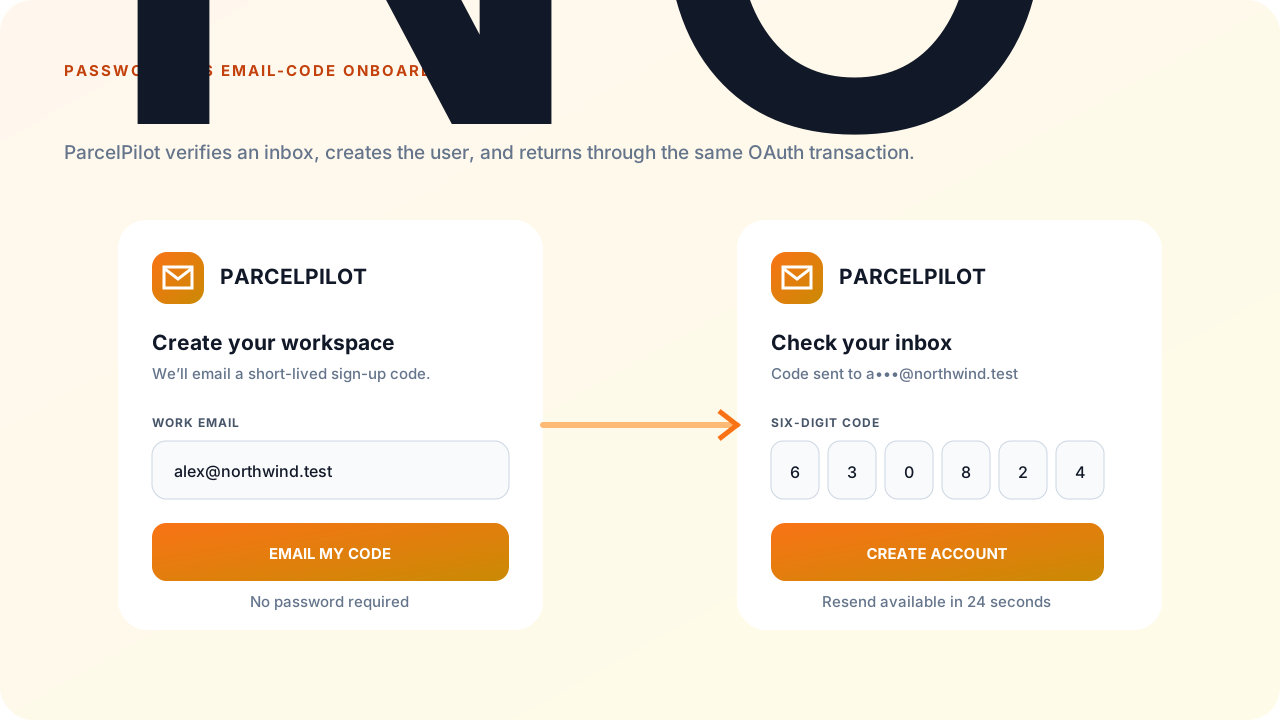
This guide builds ParcelPilot, a fictional logistics app. A new customer enters a name, work email, and workspace name; SqlOS sends a six-digit code; successful verification creates a passwordless user, verifies the primary email, creates the organization, and returns to ParcelPilot with an OAuth authorization code.
The user sees two product-owned steps:
SqlOS owns challenge generation, delivery, rate limits, attempts, signup-token state, user and organization creation, the signup hook transaction, and OAuth completion.
Use the transactional email sender for the built-in auth.email-otp template, then configure OTP policy separately:
const string publicOrigin = "https://identity.parcelpilot.test";

builder.AddSqlOS<AppDbContext>(options =>
{
    options.ConfigureEmail(email =>
    {
        email.AzureCommunicationServicesConnectionString =
            builder.Configuration["SqlOS:Email:AzureCommunicationServicesConnectionString"];
        email.FromAddress = builder.Configuration["SqlOS:Email:FromAddress"];
    });

    var auth = options.AuthServer;
    auth.PublicOrigin = publicOrigin;
    auth.Issuer = $"{publicOrigin}/sqlos/auth";
    auth.ConfigureEmailOtp(otp =>
    {
        otp.ApplicationName = "ParcelPilot";
        otp.ChallengeLifetime = TimeSpan.FromMinutes(10);
        otp.ResendCooldown = TimeSpan.FromSeconds(30);
        otp.MaxAttempts = 5;
        otp.MaxChallengesPerHour = 5;
        otp.MaxChallengesPerIpPerHour = 60;
        otp.MaxChallengesPerClientPerHour = 300;
    });

    auth.EnableLocalPasswordAuth = false;
    auth.SeedAuthPage(page =>
    {
        page.EnabledCredentialTypes = ["email_otp"];
        page.EnablePasswordSignup = false;
    });

    auth.SeedAuthEmails(email =>
    {
        email.ApplicationName = "ParcelPilot";
        email.PrimaryColor = "#4f46e5";
        email.AccentColor = "#0f172a";
        email.BackgroundColor = "#f5f3ff";
    });
});
Create and verify the ACS Email domain and sender before enabling the flow in production. Customize the stored template in Dashboard > Communications > Templates; keep the code placeholder intact.
using Microsoft.AspNetCore.WebUtilities;

options.AuthServer.SeedClient(client =>
{
    client.ClientId = "parcelpilot-web";
    client.Name = "ParcelPilot Web";
    client.Audience = "https://api.parcelpilot.test";
    client.RedirectUris = ["https://app.parcelpilot.test/auth/callback"];
    client.AllowedScopes = ["openid", "profile", "email", "offline_access"];
    client.ClientType = "public_pkce";
    client.RequirePkce = true;
    client.IsFirstParty = true;
});

options.AuthServer.UseHeadlessAuthPage(headless =>
{
    headless.BuildUiUrl = context => QueryHelpers.AddQueryString(
        "https://app.parcelpilot.test/join",
        new Dictionary<string, string?>
        {
            ["request"] = context.RequestId,
            ["view"] = context.View
        });

    headless.OnHeadlessSignupAsync = async (context, ct) =>
    {
        if (!string.Equals(
            context.AuthorizationRequest?.ClientApplication?.ClientId,
            "parcelpilot-web",
            StringComparison.Ordinal))
        {
            return;
        }

        var teamSize = context.CustomFields["teamSize"]?.GetValue<string>()?.Trim();
        if (teamSize is not ("1" or "2-10" or "11-50" or "51+"))
        {
            throw new SqlOSHeadlessValidationException(
                "Choose a team size.",
                new Dictionary<string, string>
                {
                    ["teamSize"] = "Choose one of the available team sizes."
                });
        }

        await onboarding.SaveAsync(
            context.User.Id,
            context.Organization?.Id,
            teamSize,
            ct);
    };
});
If the signup hook throws SqlOSHeadlessValidationException, SqlOS rolls back its new user and organization and returns field errors while preserving retryable OTP state. The hook is global, so the client guard prevents ParcelPilot's required fields from breaking other clients on the same identity host. SqlOS owns auth records; onboarding owns ParcelPilot's product profile.
Writes through a different DbContext, database, or external API do not automatically roll back with SqlOS. Share the transaction where possible; otherwise make provisioning idempotent by SqlOS user ID and compensatable or outbox-driven. Do not trigger an irreversible side effect before OAuth completion and call the whole sequence atomic.
Because the UI and identity host use different origins, allow only the product origin and credentials on the SqlOS host:
builder.Services.AddCors(cors =>
{
    cors.AddPolicy("parcelpilot-auth", policy =>
    {
        policy.WithOrigins("https://app.parcelpilot.test")
            .AllowAnyHeader()
            .AllowAnyMethod()
            .AllowCredentials();
    });
});

var app = builder.Build();
app.UseCors("parcelpilot-auth");
Do not combine AllowAnyOrigin with credentials. A same-origin backend-for-frontend proxy can avoid browser CORS, but it must preserve the SqlOS request cookie and keep the flow tokens out of logs.
Start /authorize with the OIDC library your stack already ships — Auth.js, angular-oauth2-oidc, or ASP.NET Core AddOpenIdConnect. Those libraries own S256 PKCE, state, and the later /token call. Pass view=signup as an authorization parameter:
signIn("sqlos", { callbackUrl: "/app" }, { view: "signup" });SqlOS saves the authorization request and redirects to BuildUiUrl, for example:
https://app.parcelpilot.test/join?request=req_...&view=signupResume that request with @sqlos/headless. Do not call /sqlos/auth/headless from application fetch helpers, and do not treat the query string as authoritative auth state.
import { createHeadlessFlow } from "@sqlos/headless";
import { useHeadlessAuth } from "@sqlos/headless/react";

const flow = createHeadlessFlow({
  issuer: "https://identity.parcelpilot.test/sqlos/auth",
  clientId: "parcelpilot-web",
  redirectUri: "https://app.parcelpilot.test/auth/callback",
  credentials: "include",
});

await flow.resume(window.location);
React snapshots:
const { flow, status, view, viewModel, error, fieldErrors, redirectUrl } =
  useHeadlessAuth({
    issuer: "https://identity.parcelpilot.test/sqlos/auth",
    clientId: "parcelpilot-web",
    redirectUri: "https://app.parcelpilot.test/auth/callback",
    credentials: "include",
  });
credentials: "include" is required in the browser so the issuer session cookie is sent. See Build your own login and signup UI for the full view loop.
Actions take user input only. The flow keeps requestId, challenge, and signup tokens internally. Server and validation failures resolve — read flow.error and flow.fieldErrors instead of try/catch:
await flow.emailOtp.signupStart({
  displayName: "Avery Chen",
  email: "avery@northwind.test",
  organizationName: "Northwind Dispatch",
  customFields: {
    teamSize: "2-10",
    plan: "starter",
  },
});

if (flow.status === "error") {
  showError(flow.error, flow.fieldErrors);
  return;
}
Do not copy challenge or signup tokens into component state, URLs, analytics, durable browser storage, or logs.
The returned view model includes values like:
{
  "view": "email-otp-signup-verify",
  "email": "avery@northwind.test",
  "info": "Check av***@northwind.test for a sign-up code."
}The headless view model does not currently expose expiresAt, nextAllowedSendAt, or a separate maskedEmail. The masked address is embedded in info. Configure the same 30-second cooldown in the UI, but keep the server rate limit authoritative. The direct backend SDK result does expose timestamps.
await flow.emailOtp.signupVerify({ code });

if (flow.status === "redirect" && flow.redirectUrl) {
  window.location.assign(flow.redirectUrl);
  return;
}

if (flow.status === "error") {
  showError(flow.error, flow.fieldErrors);
  return;
}

render(flow.viewModel);
Always leave with window.location.assign(flow.redirectUrl). Do not assume verification always goes straight to the app callback. SqlOS may return another view for organization selection, MFA, or validation errors. Render the returned state machine.
On success, SqlOS transactionally:
Northwind Dispatch and an owner membership;OnHeadlessSignupAsync;user.signup.email_otp;Follow redirectUrl so the OIDC library finishes at its registered callback and exchanges the code at /token. If you bound resource on /authorize, the library must send the same value at token exchange — omitting or changing it fails the request.
Disable resend locally for the configured cooldown. When the user requests another code, call flow.emailOtp.signupStart again with the same signup fields. The flow replaces both tokens:
await flow.emailOtp.signupStart(signupDraft);A new challenge supersedes the previous active challenge in that signup context. A code from the older email must fail even if it has not reached its nominal expiry.
flow.emailOtp.start and flow.emailOtp.verify instead.flow.redirectUrl with window.location.assign.organizationId; use an invitation.flow.invitation.signup, not a second signup OTP challenge.The current signup-start endpoint explicitly tells the caller when an account already exists for the email. Treat that as an enumeration surface: enforce the configured email/IP/client limits, add bot controls at the edge, monitor abuse, and confirm the disclosure fits your product's threat model.
@sqlos/headless hold signup and challenge tokens; do not copy them into app state, URLs, or logs.signupStart again on resend and test that the old code fails.ParcelPilot gets a polished two-step onboarding experience without storing a password or implementing its own identity state machine. One successful inbox verification drives the SqlOS user, organization, owner membership, session, and OAuth redirect; the guarded, idempotent hook provisions the product profile without pretending an external store participates in the SqlOS transaction.