SMS sign-in for mobile apps
Build a passwordless native sign-in flow with phone codes, PKCE, and SqlOS headless auth.
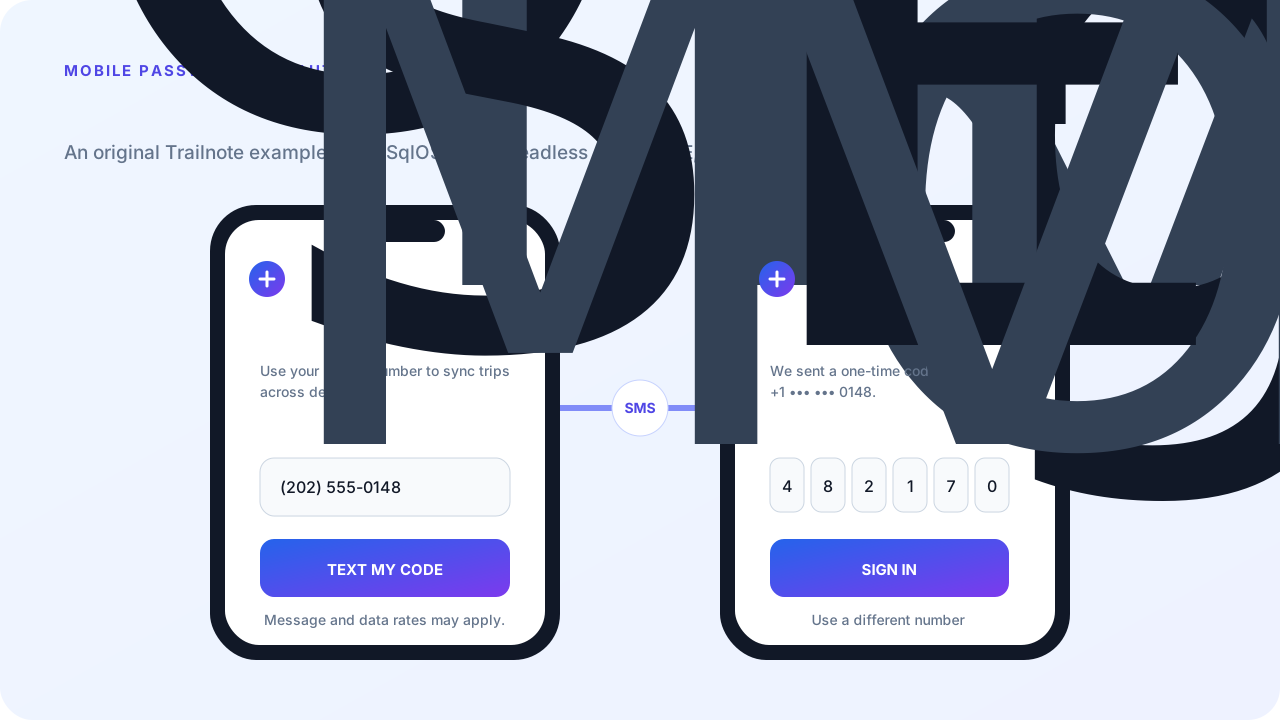
This guide builds Trailnote, a fictional mobile app with a custom URI callback at trailnote://auth/callback. The app collects a phone number, asks SqlOS to send a short-lived code through Twilio Verify, verifies that code, and finishes a normal OAuth authorization-code flow with PKCE.
Phone codes are vulnerable to SIM swap, number reassignment, carrier delivery failures, and interception. SqlOS does not treat phone_otp as strong MFA by default. Require Authenticator MFA or another stronger method for privileged actions.
The native app owns two screens:
TEXT MY CODESIGN INSqlOS owns the authorization request, phone normalization, provider delivery, challenge lifetime, rate limits, user/session creation, authorization code, and tokens.
Create a Twilio Verify Service with SMS enabled. You need its VA... service SID plus the account SID and auth token. You do not need to buy a Programmable Messaging phone number; Twilio Verify manages the sender path.
Keep all three values in server configuration:
SqlOS__PhoneOtp__Enabled=true
SqlOS__PhoneOtp__TwilioAccountSid=<account-sid>
SqlOS__PhoneOtp__TwilioAuthToken=<auth-token>
SqlOS__PhoneOtp__TwilioVerifyServiceSid=<verify-service-sid>
SqlOS__PhoneOtp__DefaultRegion=US
Enable phone OTP and keep the initial rollout geographically narrow:
const string publicOrigin = "https://api.example.com";

builder.AddSqlOS<AppDbContext>(options =>
{
    var auth = options.AuthServer;
    auth.PublicOrigin = publicOrigin;
    auth.Issuer = $"{publicOrigin}/sqlos/auth";

    auth.ConfigurePhoneOtp(phone =>
    {
        phone.Enabled = true;
        phone.TwilioAccountSid = builder.Configuration["SqlOS:PhoneOtp:TwilioAccountSid"];
        phone.TwilioAuthToken = builder.Configuration["SqlOS:PhoneOtp:TwilioAuthToken"];
        phone.TwilioVerifyServiceSid = builder.Configuration["SqlOS:PhoneOtp:TwilioVerifyServiceSid"];
        phone.DefaultRegion = "US";
        phone.CountryAllowList = ["US", "CA"];
        phone.MaxSendsPerPhone = 5;
        phone.MaxSendsPerIp = 60;
        phone.MaxSendsPerClient = 300;
    });

    auth.SeedAuthPage(page =>
    {
        page.EnabledCredentialTypes = ["phone_otp"];
        page.EnablePasswordSignup = false;
    });
});
Startup validation fails when phone OTP is enabled without a complete Twilio configuration.
Native headless auth is deliberately opt-in. Register a first-party PKCE client, its exact deep link, and allowNativeHeadlessAuth: true:
options.AuthServer.SeedClient(client =>
{
    client.ClientId = "trailnote-mobile";
    client.Name = "Trailnote Mobile";
    client.Audience = "https://api.example.com";
    client.RedirectUris = ["trailnote://auth/callback"];
    client.AllowedScopes = ["openid", "profile", "offline_access"];
    client.ClientType = "public_pkce";
    client.RequirePkce = true;
    client.IsFirstParty = true;
    client.AllowNativeHeadlessAuth = true;
});
Configure the same scheme in the mobile app. For an Expo app:
{
  "expo": {
    "scheme": "trailnote"
  }
}POST /sqlos/auth/headless/start accepts only a first-party public_pkce client with PKCE required, an exact registered redirect URI, and native headless auth enabled.
On native there is no browser redirect into your page. Drive the flow with @sqlos/headless. flow.start creates the authorization request and generates PKCE. Where Web Crypto subtle is unavailable (for example Expo), pass createPkceGenerator({ randomBytes, sha256 }) built from expo-crypto primitives — see the package reference. Do not call /sqlos/auth/headless from application fetch helpers.
import { createHeadlessFlow, generatePkce } from "@sqlos/headless";
import { useHeadlessAuth } from "@sqlos/headless/react-native";
import { exchangeCodeAsync } from "expo-auth-session";

const issuer = "https://api.example.com/sqlos/auth";
const clientId = "trailnote-mobile";
const redirectUri = "trailnote://auth/callback";

const flow = createHeadlessFlow({
  issuer,
  clientId,
  redirectUri,
  generatePkce, // on Expo: createPkceGenerator({ randomBytes, sha256 }) from expo-crypto
});

await flow.start({
  scope: "openid profile offline_access",
  resource: "https://api.example.com",
  view: "login",
});

if (flow.status === "error") {
  showError(flow.error, flow.fieldErrors);
}
React Native snapshots:
const { flow, status, view, viewModel, error, fieldErrors, redirectUrl } =
  useHeadlessAuth({
    issuer,
    clientId,
    redirectUri,
    generatePkce,
  });
Omit credentials on native. Do not replace PKCE or state with a client secret. Native apps are public clients and cannot safely hold one. See Build your own login and signup UI.
Use E.164 at the API boundary. A phone input may display (202) 555-0148, but submit +12025550148.
await flow.phoneOtp.start({ phoneNumber: "+12025550148" });

if (flow.status === "error") {
  showError(flow.error, flow.fieldErrors);
  return;
}
The flow holds the challenge token. Do not copy it into app state, analytics, or logs. SqlOS intentionally cannot reconstruct and return the raw token after a request reload.
For a React Native input, let the OS offer phone and SMS-code affordances:
<TextInput
  accessibilityLabel="Mobile phone number"
  autoComplete="tel"
  keyboardType="phone-pad"
  textContentType="telephoneNumber"
/>

<TextInput
  accessibilityLabel="One-time verification code"
  autoComplete="sms-otp"
  keyboardType="number-pad"
  textContentType="oneTimeCode"
/>await flow.phoneOtp.verify({ code });
if (flow.status === "error") {
showError(flow.error, flow.fieldErrors);
return;
}
if (flow.status === "redirect" && flow.authorization) {
const tokens = await exchangeCodeAsync(
{
clientId,
code: flow.authorization.code,
redirectUri: flow.authorization.redirectUri,
extraParams: {
code_verifier: flow.authorization.codeVerifier ?? "",
resource: "https://api.example.com",
},
},
{ tokenEndpoint: `${issuer}/token` },
);
// Store tokens in your app session — not in this package.
return;
}
if (flow.status === "redirect" && flow.redirectUrl && !flow.authorization) {
// External provider URL — open it; do not treat it as a code callback.
return;
}
render(flow.viewModel);The package never calls /token. Hand the authorization code to expo-auth-session. Store the resulting refresh token in Keychain/Keystore-backed storage, not AsyncStorage.
New users use the parallel signup actions. The flow holds signupToken and challengeToken:
await flow.phoneOtp.signupStart({
  displayName: "Alex Rivera",
  phoneNumber: "+12025550148",
  organizationName: "Trailnote",
});

await flow.phoneOtp.signupVerify({ code });The mobile app presents its own phone and code screens while SqlOS owns the complete OAuth and OTP state machine. A successful code verification returns through the registered callback, exchanges with PKCE, and creates a normal SqlOS session without any password or client secret in the app.