Build your own login and signup UI
Render a product-owned browser UI while SqlOS keeps OAuth, credentials, organizations, and MFA server-owned.
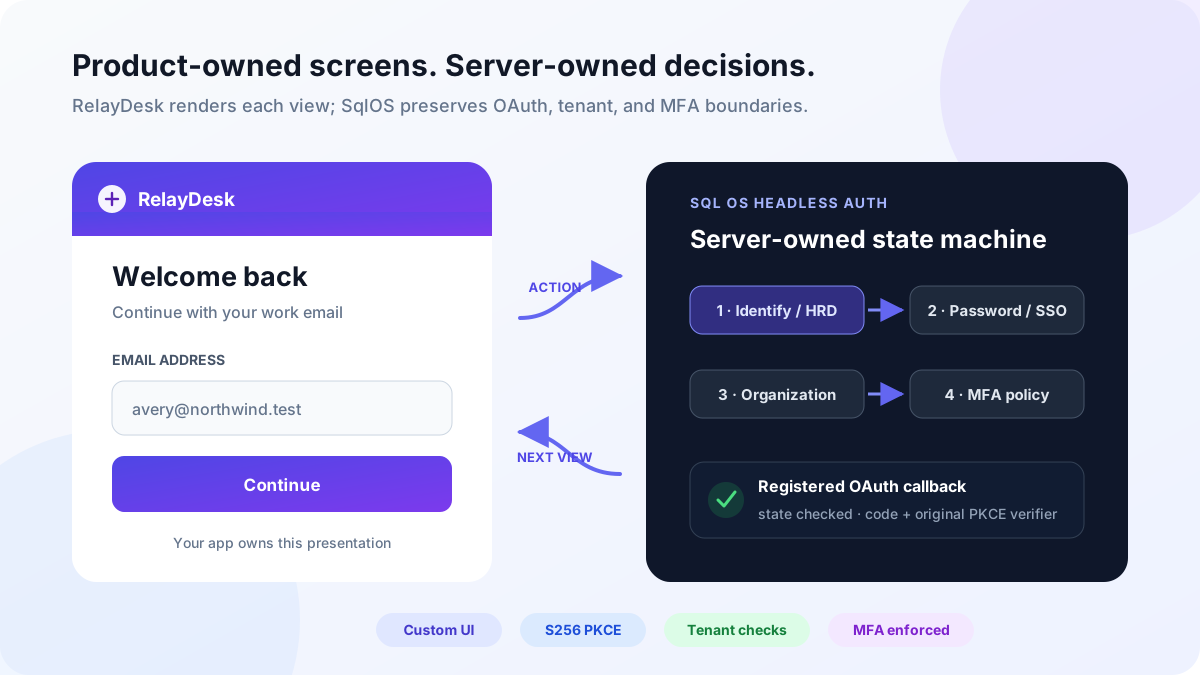
This guide builds RelayDesk, a fictional support application. RelayDesk renders the email, password, organization, MFA, and consent screens. SqlOS validates every transition and eventually returns a normal authorization code to RelayDesk's registered callback.
The browser completes this flow:
OIDC library starts /authorize (S256 PKCE + state)
  -> RelayDesk login form
  -> password, SSO, or another server-selected step
  -> organization, MFA, or consent when required
  -> library callback + authorization code
  -> library /token exchange
Your UI draws the current view and submits user input. SqlOS still owns the saved authorization request, redirect validation, credentials, HRD, SAML/OIDC callbacks, invitations, organization membership, MFA policy, authorization code, session, and tokens.
Hosted AuthPage is the shortest integration. Choose headless when the authentication screens must use your design system, collect product-owned signup fields, or support product-specific experiments. Headless is not a password grant and does not turn your frontend into an authorization server.
When SqlOS and your UI share an origin in the standard one-app flow, skip the client and CORS setup below and add app.Headless("/auth/authorize") to UseSingleApplication. SqlOS seeds the PKCE client and forwards the same request, view, email, pendingToken, mfaToken, and consentToken parameters this guide uses. Continue from step 2.
RelayDesk keeps its identity host and product UI on different origins, so it declares the client and the custom page explicitly. Configure one public PKCE client, then tell SqlOS where RelayDesk renders authorization views:
using Microsoft.AspNetCore.WebUtilities;

const string identityOrigin = "https://identity.relaydesk.example";
const string applicationOrigin = "https://app.relaydesk.example";

builder.Services.AddCors(cors =>
{
    cors.AddPolicy("relaydesk-auth", policy =>
    {
        policy.WithOrigins(applicationOrigin)
            .AllowAnyHeader()
            .AllowAnyMethod()
            .AllowCredentials();
    });
});

builder.AddSqlOS<AppDbContext>(options =>
{
    var auth = options.AuthServer;
    auth.PublicOrigin = identityOrigin;
    auth.Issuer = $"{identityOrigin}/sqlos/auth";

    auth.SeedClient(client =>
    {
        client.ClientId = "relaydesk-web";
        client.Name = "RelayDesk";
        client.RedirectUris = [$"{applicationOrigin}/auth/callback"];
        client.AllowedScopes = ["openid", "profile", "email", "offline_access"];
        client.ClientType = "public_pkce";
        client.RequirePkce = true;
        client.IsFirstParty = true;
    });

    auth.UseHeadlessAuthPage(headless =>
    {
        headless.BuildUiUrl = context => QueryHelpers.AddQueryString(
            $"{applicationOrigin}/auth/authorize",
            new Dictionary<string, string?>
            {
                ["request"] = context.RequestId,
                ["view"] = context.View,
                ["error"] = context.Error,
                ["email"] = context.Email,
                ["displayName"] = context.DisplayName,
                ["pendingToken"] = context.PendingToken,
                ["mfaToken"] = context.MfaToken
            });
    });
});

var app = builder.Build();
app.UseCors("relaydesk-auth");
BuildUiUrl is the mode switch. When it exists, /sqlos/auth/authorize redirects browser interaction to your page. There is no separate dashboard toggle.
The default JSON API is /sqlos/auth/headless. HeadlessApiBasePath can move it, and EnableApi = false removes it. The examples below use the default. If your host moves it, configure the frontend's initial request URL to the same exact path, then compare it with the returned model's effective headlessApiBasePath and stop on a mismatch.
Treat the URL values as presentation and flow context, not proof of identity. Load the saved request from SqlOS before rendering; the returned model contains the request's persisted uiContext when you supplied one to /authorize. Avoid logging full authorize-page URLs because callback errors and opaque pending state can appear in the query.
Every cross-origin headless request must use:
credentials: "include"The SqlOS issuer session cookie is HttpOnly, uses SameSite=Lax, and is scoped to the identity host. An app at app.relaydesk.example and identity host at identity.relaydesk.example are different origins but the same site, so explicit credentialed CORS is the intended topology.
An app and identity host on unrelated sites are cross-site. AllowCredentials() does not override browser SameSite or third-party-cookie policy. Put the UI and identity host under the same registrable site, or use a reviewed first-party reverse proxy/backend-for-frontend that preserves the SqlOS cookie and does not log flow tokens.
Allow only exact product origins. Never combine AllowAnyOrigin() with credentials. Use HTTPS in production, configure trusted forwarded headers at the proxy, and keep the configured public origin, issuer, browser URL, and registered callback exact.
/authorize with your OIDC library#The custom page begins at /authorize, not at a password endpoint. Use the OIDC client your stack already ships — Auth.js, angular-oauth2-oidc, expo-auth-session, or ASP.NET Core AddOpenIdConnect. Those libraries own S256 PKCE, state, discovery, and the later /token call. Do not paste Web Crypto helpers into product code, and do not add a SqlOS OAuth client package.
Auth.js (the same provider block as Sign in with X, plus offline_access when the app calls a SqlOS-protected API):
const issuer = "https://identity.relaydesk.example/sqlos/auth";

{
  id: "sqlos",
  name: "SqlOS",
  type: "oauth",
  wellKnown: `${issuer}/.well-known/openid-configuration`,
  clientId: "relaydesk-web",
  client: { token_endpoint_auth_method: "none" },
  authorization: {
    params: { scope: "openid profile email offline_access" }
  },
  idToken: true,
  checks: ["pkce", "state"],
  profile(profile) {
    return {
      id: profile.sub,
      name: profile.name ?? profile.sub,
      email: profile.email ?? null
    };
  }
}
Start the library, then pass first-party SqlOS presentation hints as authorization parameters — not a custom protocol:
signIn("sqlos", { callbackUrl: "/app" }, { prompt: "login" });
signIn("sqlos", { callbackUrl: "/app" }, { view: "signup" });
Register the library's exact callback. Auth.js defaults to /api/auth/callback/sqlos. angular-oauth2-oidc can keep /auth/callback. The seeded redirect URI and the library callback must match byte-for-byte.
That scope value must also appear on the client's AllowedScopes. An empty allowlist does not mean "any scope." Omit scope on /authorize and the grant is empty even when the rest of headless login succeeds. The headless view model includes that granted string as scope so the custom UI can show it. That remains valid OAuth. When the client allowlists openid and the grant omits it, the view model's info and omittedOpenId fields warn that no ID token will be issued for the session; with OpenID Provider mode on by default, the granted openid is what mints one. openid is never always-allowed. User access tokens still authorize APIs by audience and session, not by this string.
Headless interaction after /authorize is a view-model state machine. Drive it with @sqlos/headless. The OIDC library still finishes the code.
SqlOS redirects to a URL such as:
https://app.relaydesk.example/auth/authorize?request=req_...&view=loginimport { createHeadlessFlow } from "@sqlos/headless";
import { useHeadlessAuth } from "@sqlos/headless/react";
const flow = createHeadlessFlow({
issuer: "https://identity.relaydesk.example/sqlos/auth",
clientId: "relaydesk-web",
redirectUri: "https://app.relaydesk.example/api/auth/callback/sqlos",
credentials: "include",
});
await flow.resume(window.location);resume reads request and the presentation query, then loads the authoritative model. If the host moved HeadlessApiBasePath, pass that exact path as headlessApiBasePath and stop when it does not match the returned model.
Treat URL values as presentation and flow context, not proof of identity. Render flow.viewModel.view; do not infer the next security step from the form you just submitted.
Actions take user input only. The flow keeps requestId, challenge, pending, MFA, consent, and enrollment tokens internally.
// No try/catch for normal failures — actions resolve and update error / fieldErrors.
await flow.identify({ email });
await flow.password.login({ password });
await flow.organization.select({ organizationId });
await flow.mfa.verify({ code });
await flow.consent.approve();
Two things still reject, because they are integration bugs rather than user input: a second action while one is in flight (HeadlessFlowBusyError — disable the form while status === "loading"), and an action whose view does not carry the token it needs (HeadlessFlowNotLoadedError). Both also set status === "error". See the error table.
Show only the sign-in methods the server can serve. credentialEnabled(viewModel.settings, "email_otp") applies the same enabled-and-configured rule as hosted AuthPage. Render a fallback for any HeadlessView your screens do not draw — the examples send those users to hosted AuthPage instead of a headline with no form.
React:
const { flow, status, view, viewModel, error, fieldErrors, redirectUrl } =
  useHeadlessAuth({ issuer, clientId, redirectUri, credentials: "include" });
identify runs home realm discovery. Follow a returned redirect instead of showing a password form; the email may belong to an organization that requires SAML SSO. The initial email screen is the login view — there is no identify view.
Non-first-party clients surface the consent view before their first code is issued (see Consent). Render clientName and consentScopes, then call flow.consent.approve() or flow.consent.deny().
Keep one flow object per authorization request. Do not share it across tabs, users, or parallel requests.
The flow applies the server result. After each action:
if (flow.status === "redirect" && flow.redirectUrl) {
  window.location.assign(flow.redirectUrl);
  return;
}

if (flow.status === "error") {
  showError(flow.error, flow.fieldErrors);
  return;
}

render(flow.viewModel);
Always leave with window.location.assign(flow.redirectUrl). A redirect may go to an external OIDC/SAML provider (flow.authorization is null) or to RelayDesk's exact registered callback with a code (flow.authorization). Never replace it with a URL constructed from user input. A view means SqlOS requires another interaction; render it instead of issuing tokens or declaring the user signed in.
When headless login completes, SqlOS redirects to the exact registered callback with an authorization code. Follow that URL. Do not exchange the code in application helpers.
Auth.js finishes at /api/auth/callback/<id>. angular-oauth2-oidc finishes with tryLoginCodeFlow(). expo-auth-session finishes with exchangeCodeAsync. Refresh uses POST /sqlos/auth/token with grant_type=refresh_token through the same library.
Connect the library session to your application's reviewed storage design. Do not persist refresh tokens in localStorage, and do not confuse the SqlOS issuer session cookie with your application's authenticated session.
Send additional values in customFields, then validate them in the host callback:
auth.UseHeadlessAuthPage(headless =>
{
    headless.BuildUiUrl = BuildRelayDeskAuthorizeUrl;
    headless.OnHeadlessSignupAsync = async (context, cancellationToken) =>
    {
        if (!string.Equals(
            context.AuthorizationRequest?.ClientApplication?.ClientId,
            "relaydesk-web",
            StringComparison.Ordinal))
        {
            return;
        }

        var team = context.CustomFields["supportTeam"]?.GetValue<string>()?.Trim();
        if (string.IsNullOrWhiteSpace(team))
        {
            throw new SqlOSHeadlessValidationException(
                "Choose a support team.",
                new Dictionary<string, string>
                {
                    ["supportTeam"] = "Support team is required."
                });
        }

        await profiles.SaveAsync(context.User.Id, team, cancellationToken);
    };
});
The callback is global, so guard app-specific required fields by client. Writes through the SqlOS DbContext participate in its signup transaction; a separate database or external API does not. Make external provisioning idempotent and compensatable or outbox-driven.
The core transition rule stays the same. Add only the views your enabled policy can return:
| Returned view or branch | What the UI must do | Focused documentation |
|---|---|---|
email-otp, email-otp-verify, email-otp-signup-verify | Start or verify an inbox code while retaining challenge/signup tokens | Email-code onboarding |
magic-link, magic-link-sent | Send an opt-in sign-in link (flow.magicLink.start); consume the emailed token with flow.magicLink.complete({ token }) — there is no headless confirm view | Magic-link login |
phone-otp, phone-otp-verify, phone-otp-signup, phone-otp-signup-verify | Start or verify a Twilio code | SMS mobile sign-in |
signup | Submit display name, email, password, organization name, and optional custom fields | Password login |
invite, invite-login, invite-email-otp-verify, invite-accepted | Resolve and preserve the invitation-bound request instead of starting unrelated signup | Invite teammates |
| Provider redirect | Follow the exact returned OIDC/SAML URL; SqlOS owns callback validation | Social sign-in · SAML SSO |
mfa, mfa-enroll | Verify an existing factor or render forced enrollment with its returned token and QR data | Authenticator MFA |
consent | Show the client name and consentScopes, then call flow.consent.approve() or flow.consent.deny() | Consent |
forgot-password, forgot-password-sent, password-reset | Keep recovery enumeration-safe and use the configured reset destination | Account recovery |
device, device-approve, device-approved, device-denied | Keep the device request bound to its request ID and require explicit approval | CLI OAuth |
Use @sqlos/headless for the flow object, then the Headless AuthPage HTTP reference for exact server records. Do not guess a response field: route validation errors are not yet one universal JSON envelope.
The broad example contains complete Next.js, Angular, and Expo headless clients:
./scripts/setup-js-examples.sh
dotnet run --project examples/SqlOS.Example.AppHost/SqlOS.Example.AppHost.csproj
Equivalent install order:
npm ci --prefix packages/headless && npm run build --prefix packages/headless
npm ci --prefix examples/SqlOS.Example.Web
npm ci --prefix examples/SqlOS.Example.AngularWeb
Open http://localhost:3010, choose the headless/custom UI entry point, and complete password signup or login. The custom page is /auth/authorize; Auth.js finishes at /api/auth/callback/sqlos. The Angular client at http://localhost:4200 uses angular-oauth2-oidc with /auth/callback. Expo uses flow.start() and in-app screens; expo-auth-session finishes /token.
Compare these source files before adapting the pattern:
examples/SqlOS.Example.Api/Program.cs — host configuration, CORS, and signup hookexamples/SqlOS.Example.Web/lib/auth.ts — Auth.js OIDC providerexamples/SqlOS.Example.Web/components/sqlos-headless-auth-panel.tsx — useHeadlessAuth + screen renderingexamples/SqlOS.Example.AngularWeb/src/app/auth.config.ts — angular-oauth2-oidc discoveryexamples/SqlOS.Example.AngularWeb/src/app/pages/auth-authorize/auth-authorize.component.ts — createHeadlessFlow in Angularexamples/SqlOS.Example.ExpoApp/components/HeadlessAuthForm.tsx — native start() + in-app screens| Symptom | Check |
|---|---|
Request load returns 400 or 404 | The request may be expired, the ID may be wrong, or EnableApi may be false. Start a new /authorize request. |
| Browser reports a CORS failure | Match the exact frontend origin, allow credentials, and send credentials: "include". Do not use a wildcard. |
| Reusable auth state disappears | Keep the UI and identity host same-site; credentialed CORS cannot defeat SameSite=Lax or third-party-cookie blocking. |
| SqlOS rejects the authorize request | Match the seeded client ID and callback exactly, including scheme, host, port, path, and path case. |
| Callback says state or verifier is missing | Finish in the same tab so the OIDC library still has its PKCE verifier and state. Start a new request rather than weakening validation. |
| Login succeeds but the UI stops | Render the returned organization, mfa, or mfa-enroll view. Primary credentials do not bypass later policy. |
| SSO domain still shows password | Always call /identify; do not choose password locally before HRD runs. |
| Invitation loses its organization | Preserve the invitation-bound request and token; do not restart ordinary signup from an invite tab. |
| Sign out, then Sign in skips AuthPage | The issuer session cookie is still set. Navigate to GET /sqlos/auth/logout?returnTo=... and send prompt=login on the next /authorize. |
localStorageGET /sqlos/auth/logout; explicit Sign in / Sign up send prompt=loginContinue with Production Readiness and Test Your Integration before shipping.