Invite-only B2B onboarding
Invite verified people into an existing organization without trusting tenant or role data from the browser.
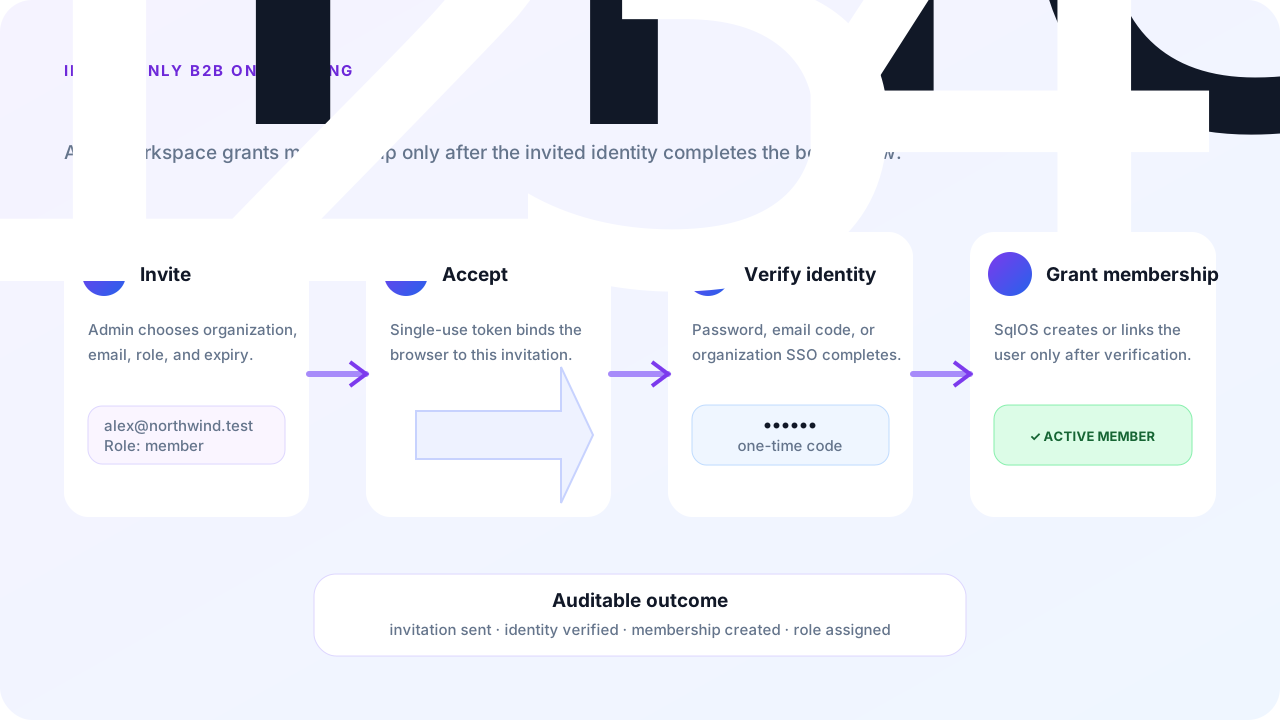
This guide builds Atlas Workspace, a fictional B2B planning app. An organization owner invites a teammate from Atlas's members page. SqlOS emails a one-time link, verifies the invited identity, and creates the membership only after successful acceptance.
SqlOS makes membership in an existing organization invite-only: public signup cannot join an existing organization by supplying an organizationId. It does not currently have a global switch that disables every form of standalone account creation while preserving new-invitee signup. In particular, enabling Email OTP also enables generic Email OTP signup. Describe the guarantee as invite-only organization access, not invite-only user records.
Atlas should enforce this lifecycle:
Use a real public origin so links generated behind a proxy or container ingress point back to the externally reachable SqlOS host.
builder.AddSqlOS<AtlasDbContext>(options =>
{
    options.ConfigureEmail(email =>
    {
        email.AzureCommunicationServicesConnectionString =
            builder.Configuration["SqlOS:Email:AzureCommunicationServicesConnectionString"];
        email.FromAddress = builder.Configuration["SqlOS:Email:FromAddress"];
    });

    var auth = options.AuthServer;
    auth.PublicOrigin = "https://identity.atlas.example";
    auth.Issuer = "https://identity.atlas.example/sqlos/auth";

    auth.ConfigureEmailOtp(email =>
    {
        email.ApplicationName = "Atlas Workspace";
    });

    auth.ConfigureInvitations(invitations =>
    {
        invitations.ApplicationName = "Atlas Workspace";
        invitations.DefaultLifetime = TimeSpan.FromDays(3);
        invitations.MaxInvitationsPerEmailPerHour = 5;
        invitations.MaxInvitationsPerIpPerHour = 60;
        invitations.MaxInvitationsPerOrganizationPerHour = 100;
        invitations.MaxInvitationsPerInviterPerHour = 25;
    });

    auth.SeedAuthEmails(email =>
    {
        email.ApplicationName = "Atlas Workspace";
        email.PrimaryColor = "#6d28d9";
        email.AccentColor = "#111827";
        email.BackgroundColor = "#f5f3ff";
    });

    auth.SeedAuthPage(page =>
    {
        page.PageTitle = "Join Atlas Workspace";
        page.EnabledCredentialTypes = ["email_otp"];
        page.EnablePasswordSignup = false;
    });

    auth.SeedClient(client =>
    {
        client.ClientId = "atlas-web";
        client.Name = "Atlas Workspace";
        client.Audience = "https://api.atlas.example";
        client.RedirectUris = ["https://app.atlas.example/auth/callback"];
        client.AllowedScopes = ["openid", "profile", "email", "offline_access"];
        client.ClientType = "public_pkce";
        client.RequirePkce = true;
        client.IsFirstParty = true;
    });
});
Email OTP serves two purposes here: existing passwordless users can prove their identity with a code, and AuthPage can create a new passwordless user from the invitation. The new-invitee path treats possession of the emailed invitation link as the proof and does not send a second OTP challenge.
SqlOS creates the built-in auth.invitation template automatically. Customize it in Dashboard > Communications > Templates without changing the runtime variables or token-bearing accept URL.
Invitation creation is an administrative product action. Declare app.Api = "/api" and lock the team group with RequireAuthorization():
using SqlOS.AuthServer.Extensions;

var team = app.MapGroup("/api/team").RequireAuthorization();
The SqlOS scheme validates the signature, issuer, audience, token lifetime, and current session. It then makes the validated UserId, OrganizationId, and SessionId available through GetSqlOSValidatedToken().
The following endpoint never accepts an organization id, inviter id, OAuth callback, scope, or resource from the browser. AtlasTeamAuthorization is an app-owned policy service; it must verify that the actor can manage members in the token's organization.
using System.Text.Json.Nodes;
using SqlOS.AuthServer.Contracts;
using SqlOS.AuthServer.Extensions;
using SqlOS.AuthServer.Services;

app.MapPost("/api/team/invitations", async (
    CreateAtlasInvitationRequest request,
    HttpContext http,
    AtlasTeamAuthorization teamAuthorization,
    SqlOSAuthService authService,
    CancellationToken ct) =>
{
    var actor = http.GetSqlOSValidatedToken();
    if (actor?.UserId is null)
    {
        return Results.Unauthorized();
    }

    if (actor.OrganizationId is null)
    {
        return Results.Forbid();
    }

    if (!await teamAuthorization.CanInviteAsync(
        actor.UserId,
        actor.OrganizationId,
        ct))
    {
        return Results.Forbid();
    }

    var role = request.Role?.Trim().ToLowerInvariant() switch
    {
        "member" => "member",
        "admin" => "admin",
        _ => null
    };

    if (role is null)
    {
        return Results.BadRequest(new { message = "Role must be member or admin." });
    }

    var invitation = await authService.CreateEmailInvitationAsync(
        new SqlOSCreateEmailInvitationRequest(
            OrganizationId: actor.OrganizationId,
            Email: request.Email,
            Role: role,
            ClientId: "atlas-web",
            RedirectUri: "https://app.atlas.example/auth/callback",
            Scope: "openid profile email offline_access",
            Resource: "https://api.atlas.example",
            CustomFields: new JsonObject
            {
                ["source"] = "members-page"
            },
            InvitedByUserId: actor.UserId,
            SendEmail: true),
        http,
        ct);

    // Deliberately omit invitation.InviteUrl from the browser response.
    return Results.Ok(new
    {
        invitation.Id,
        invitation.Email,
        invitation.Role,
        invitation.Status,
        invitation.ExpiresAt
    });
});

public sealed record CreateAtlasInvitationRequest(string Email, string? Role);
CreateEmailInvitationAsync confirms that the organization is active, validates the fixed client and redirect URI, applies invitation rate limits, supersedes an older pending invite for the same organization/email, and records invitation.created. It deliberately does not decide whether the caller is allowed to invite or which product roles are valid; Atlas owns those decisions.
SqlOSEmailInvitationResult.InviteUrl contains the raw bearer-style invitation token. Keep it out of browser telemetry, audit metadata, support transcripts, and ordinary API responses. Returning it is appropriate only for an explicitly authorized copy-link workflow.
The email links to:
GET /sqlos/auth/invitations/accept?token=...With this guide's configuration, AuthPage fixes the invited email and offers:
Acceptance is transactional. SqlOS compares normalized email before it creates access, verifies the matching email, creates or reactivates membership, consumes the invitation, and completes the OAuth redirect. If the matching email was still unverified, acceptance claims it and revokes credentials attached before the claim, keeping only the one the invitee signed in with. Hosts that accept invitations through AcceptEmailInvitationAsync should set AuthenticationMethod on the request to the method the user just signed in with, for example password.
Membership behavior is intentionally idempotent:
| Existing state | Acceptance result |
|---|---|
| No membership | Create membership with the invited role |
| Inactive membership | Reactivate it with the invited role |
| Active membership | Consume the invitation and preserve the current role |
| Different effective email | Reject without creating membership |
| Accepted, revoked, or expired invitation | Reject as invalid or expired |
Keep these operations behind the same team authorization policy and verify that the invitation belongs to the actor's organization before invoking the SDK.
var resent = await authService.ResendEmailInvitationAsync(
    new SqlOSResendEmailInvitationRequest(invitationId),
    httpContext,
    ct);

var revoked = await authService.RevokeEmailInvitationAsync(
    new SqlOSRevokeEmailInvitationRequest(invitationId, "email_corrected"),
    httpContext,
    ct);
Resend rotates the raw token, so the previous link stops working. Revocation is idempotent for an unaccepted invitation; an accepted invitation cannot be revoked. The dashboard exposes the same lifecycle under an organization's Invitations tab.
If Atlas later enables SAML, keep JIT provisioning off when organization access must remain invitation- or admin-managed:
var draft = await adminService.CreateSsoConnectionDraftAsync(
    new SqlOSCreateSsoConnectionDraftRequest(
        OrganizationId: organizationId,
        DisplayName: "Customer SSO",
        PrimaryDomain: "customer.example",
        AutoProvisionUsers: false,
        AutoLinkByEmail: true));
In the delegated SSO portal these settings are named:
AllowJitProvisioning = falseRequireSsoForExistingMembers = trueWith JIT off, an unknown person cannot acquire membership merely by authenticating at the customer's IdP. A new invitee first accepts through the email invitation path. After membership exists, home realm discovery can require SSO for later sign-ins.
SqlOS rejects membership activation when a social/OIDC identity's normalized email does not match the invitation. However, the provider flow can provision or link that provider identity before the later invitation mismatch is surfaced. For a strict invite-only onboarding example, keep the credential surface to Email OTP or password until that earlier side effect fits your account-linking policy.
A custom invitation UI uses the same server-owned state machine. Drive it with @sqlos/headless (flow.invitation.resolve / flow.start or flow.resume / flow.invitation.signup). The routes below are the HTTP wire contract; client code should use the package. See Build your own login and signup UI.
| Endpoint | Purpose |
|---|---|
POST /sqlos/auth/headless/invitations/resolve | Validate the raw token and load safe invitation context |
POST /sqlos/auth/headless/start | Create a PKCE authorization request with invitationToken |
GET /sqlos/auth/headless/requests/{requestId} | Reload the bound request and invitation view |
POST /sqlos/auth/headless/invitations/signup | Create a passwordless invited account and complete acceptance |
await flow.invitation.resolve({ invitationToken });
await flow.start({ invitationToken, view: "login" });
// or, after the OIDC library starts /authorize: await flow.resume(window.location);

await flow.invitation.signup({
  displayName,
  invitationToken,
});

if (flow.status === "redirect" && flow.redirectUrl) {
  window.location.assign(flow.redirectUrl);
}
Keep the invited email read-only. Once SqlOS binds the invitation to an authorization request, keep one flow object for that request. Do not replace the invitation flow with flow.emailOtp.signupStart; that creates an unnecessary second proof and can lose the bound membership context.
SqlOSInvitationService normalizes role text but does not define your product's role model.PublicOrigin before sending real email.Atlas owners can invite a teammate without granting the browser authority over tenant or role assignment. The email recipient joins only after SqlOS verifies the invitation-bound identity, and the resulting membership is visible in the Auth dashboard with a complete invitation audit trail.