Send transactional email
Create, preview, send, retry, and inspect an application-owned email template.
AddSqlOS<TContext>()ISqlOSEmailSenderWhen an order ships, your application should:
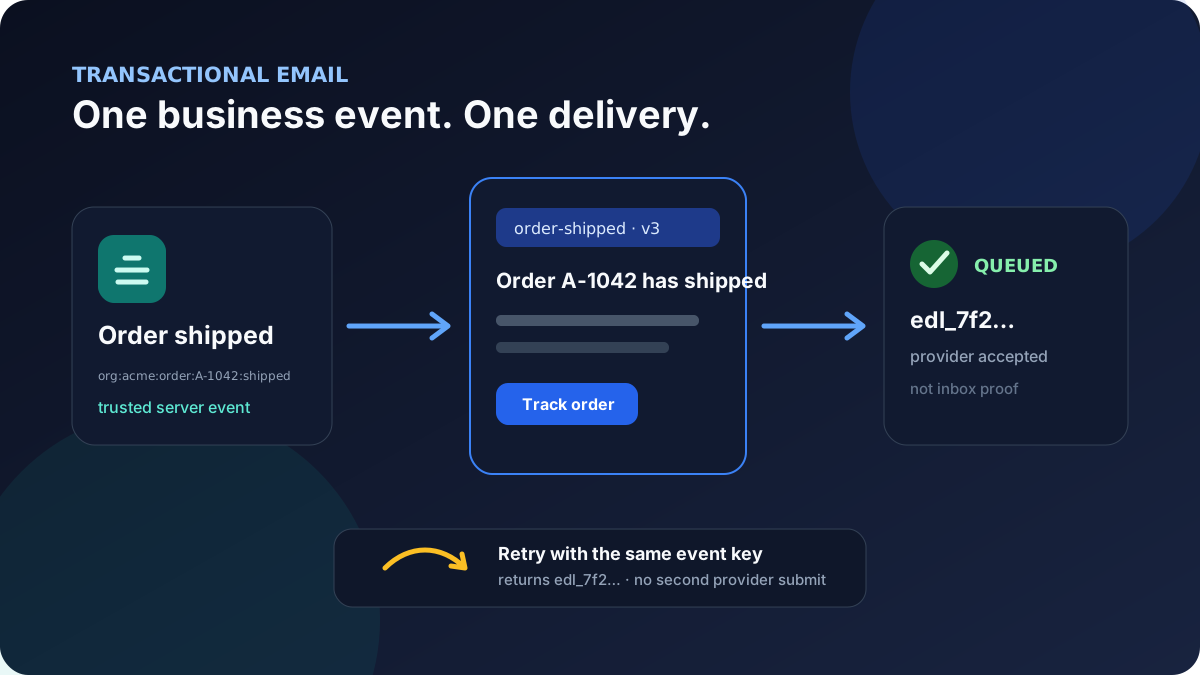
SqlOS includes an Azure Communication Services Email sender. Read its credentials from user secrets in development and a managed secret store in production:
builder.AddSqlOS<AppDbContext>(options =>
{
    options.ConfigureEmail(email =>
    {
        email.AzureCommunicationServicesConnectionString =
            builder.Configuration["SqlOS:Email:AzureCommunicationServicesConnectionString"];
        email.FromAddress =
            builder.Configuration["SqlOS:Email:FromAddress"];

        email.EnableIdempotency = true;
        email.PersistRenderedHtmlPreview = false;
        email.DeliveryRetention = TimeSpan.FromDays(90);
    });
});
Never commit the connection string. scripts/azure/setup-acs-email.sh can provision the Azure resources and DNS verification records.
If Azure Communication Services is not the right provider, register an application-owned ISqlOSEmailSender. The template, validation, idempotency, delivery-history, and dashboard behavior remain the same.
DeliveryRetention declares the host's intended retention period and is validated at startup, but the current service does not read it to delete old rows. Implement a reviewed cleanup job if the policy must be enforced automatically.
Open SqlOS Dashboard > Communications > Email Templates and create:
| Field | Value |
|---|---|
| Key | order-shipped |
| Display name | Order shipped |
| Subject | Order {orderId} has shipped |
| HTML | <p>Order <strong>{orderId}</strong> has shipped.</p><p><a href="{trackingUrl}">Track your order</a></p> |
| Text | Order {orderId} has shipped. Track it at {trackingUrl} |
Template keys are unique. Content changes increment the stored template version, so each delivery records the exact version it rendered. An inactive template cannot be sent, and ISqlOSTransactionalEmailService.PreviewAsync only resolves active templates. The operator dashboard can still preview an inactive stored template for inspection before reactivation.
Deleting an unused template removes it. Once a template has delivery history, the dashboard deactivates it instead so past deliveries keep their template relationship.
The Variables JSON saved with a template is persisted sample metadata for the editor and preview form. Keep those sample values non-secret. It is different from the per-send Variables dictionary, which is not stored as JSON on the delivery.
Use the dashboard preview before sending. You can also make preview part of an internal publishing or smoke-test workflow:
var preview = await email.PreviewAsync(
    "order-shipped",
    new Dictionary<string, object?>
    {
        ["orderId"] = "A-1042",
        ["trackingUrl"] = "https://tracking.example.test/A-1042"
    },
    ct);
The renderer has deliberately small semantics:
{variable} is the only placeholder syntax;HTML encoding prevents a value from becoming injected markup. It does not decide whether an order exists, whether a recipient may see it, or whether a URL scheme is safe. Generate trackingUrl on the trusted server from an allowlisted HTTPS origin.
Do not expose a public endpoint that accepts an arbitrary template key and variables and returns rendered output. Keep preview, template management, and test sends behind the same operator authorization as the dashboard.
Inject ISqlOSTransactionalEmailService into the application service or endpoint that owns the shipment transition. Resolve the recipient and tracking URL from authorized server-side data rather than accepting them as trusted browser input:
public sealed class ShipmentNotifier(
    OrdersDbContext db,
    ISqlOSTransactionalEmailService email)
{
    public async Task<SqlOSSendEmailResult> NotifyAsync(
        string orderId,
        string organizationId,
        CancellationToken ct)
    {
        var order = await db.Orders.SingleAsync(
            x => x.Id == orderId && x.OrganizationId == organizationId,
            ct);

        if (order.ShippedAt is null)
        {
            throw new InvalidOperationException("The order has not shipped.");
        }

        var trustedTrackingUrl =
            $"https://tracking.example.com/orders/{Uri.EscapeDataString(order.Id)}";

        return await email.SendAsync(new SqlOSSendEmailRequest(
            TemplateKey: "order-shipped",
            To: order.CustomerEmail,
            Variables: new Dictionary<string, object?>
            {
                ["orderId"] = order.Id,
                ["trackingUrl"] = trustedTrackingUrl
            },
            IdempotencyKey:
                $"org:{organizationId}:order:{order.Id}:shipped"),
            ct);
    }
}
The key describes the business event, not the HTTP attempt. It is globally unique across the delivery table, so include enough tenant and event identity to prevent two legitimate operations from sharing it. Keep the normalized key at 200 characters or fewer. Calling NotifyAsync later with the same persisted key returns the existing delivery and does not submit a second message. A random GUID on every retry defeats that protection.
Choose the event boundary carefully. If a later reshipment should send another email, give it a distinct stable event identifier such as org:acme:order:A-1042:shipment:2.
Reusing a key returns the existing pending, queued, or failed delivery without comparing the new template, recipient, or variables and without calling the provider again. Reusing a failed key is not a provider retry. If policy allows another provider attempt, create a new stable attempt/event key deliberately. Concurrent first calls are protected by the unique database index, but a racing caller can receive a persistence conflict instead of the existing result; serialize one outbox consumer per business event or reload after that conflict.
Updating the order and calling SendAsync are not automatically one atomic operation. If the shipment commit and notification must never diverge, persist an outbox event with the shipment and process it with the same stable idempotency key.
SendAsync returns the delivery id, status, template key/version, provider message id, and a sanitized error when submission fails.
| Status | Meaning |
|---|---|
pending | SqlOS persisted the delivery before calling the sender; an interrupted process or cancellation can leave the provider outcome unknown |
queued | The sender adapter returned success; the built-in ACS adapter started the Azure send operation |
failed | Configuration or provider submission failed; the sanitized outcome was persisted |
queued does not prove that the recipient's mail server or inbox accepted the message. SqlOS does not currently process delivery webhooks, bounces, or open events.
A pending row is not proof that the provider was never contacted. If cancellation or process failure happens around submission, reconcile the provider operation where possible and keep the same idempotency key while investigating; blindly using a new key can produce a duplicate.
Template lookup and rendering happen before a delivery row is created. A missing or inactive template and a missing required variable raise an error instead of contacting the provider. Those validation failures are exceptions, not failed delivery results.
Open SqlOS Dashboard > Communications > Email Messages. Filter by status, template key, recipient, or date range.
For each custom-template delivery SqlOS records:
PersistRenderedHtmlPreview is enabled.SqlOS does not store the arbitrary variables dictionary. That does not make variables consequence-free: their substituted values can appear in the stored subject and text preview.
Never place passwords, access or refresh tokens, API keys, reset tokens, secret-bearing URLs, or other credentials in a custom template. Keep secret-bearing auth flows on the built-in templates or another purpose-built protected channel.
The returned result, persisted SanitizedError, and audit-event error are sanitized. The service also passes the caught provider exception to the host's ILogger; apply provider SDK redaction, restrict log access, and do not assume the sanitized delivery field sanitizes every host log sink. Treat the delivery error as operational context, not a complete provider trace.
SqlOS seeds three built-in templates:
auth.email-otpauth.invitationauth.password-resetYou can edit their copy in Communications > Email Templates. Their rendered text and HTML are suppressed from delivery history because they contain codes or token-bearing links.
Use Email Branding for shared product identity and colors. Existing BuildMessage callbacks and custom ISqlOSAuthEmailSender implementations remain the advanced escape hatch for auth-specific layouts or provider behavior.
This subsystem is for operational product email. It does not provide campaigns, subscriber lists, preference management, or marketing-email compliance workflows.
Before production, prove each boundary:
trackingUrl fails before provider submission;org:acme:order:A-1042:shipped returns the first delivery and performs no second provider submission;ISqlOSTransactionalEmailService, while the operator dashboard can still preview it;The repository's focused regression suite exercises these semantics:
dotnet test tests/SqlOS.Tests/SqlOS.Tests.csproj \
  --filter FullyQualifiedName~SqlOSTransactionalEmailTests