Add Audit Logs
Record application audit events and review them in the SqlOS dashboard.
AddSqlOS<TContext>()When a user changes an important business resource, SqlOS should store a structured event that an operator can later answer:
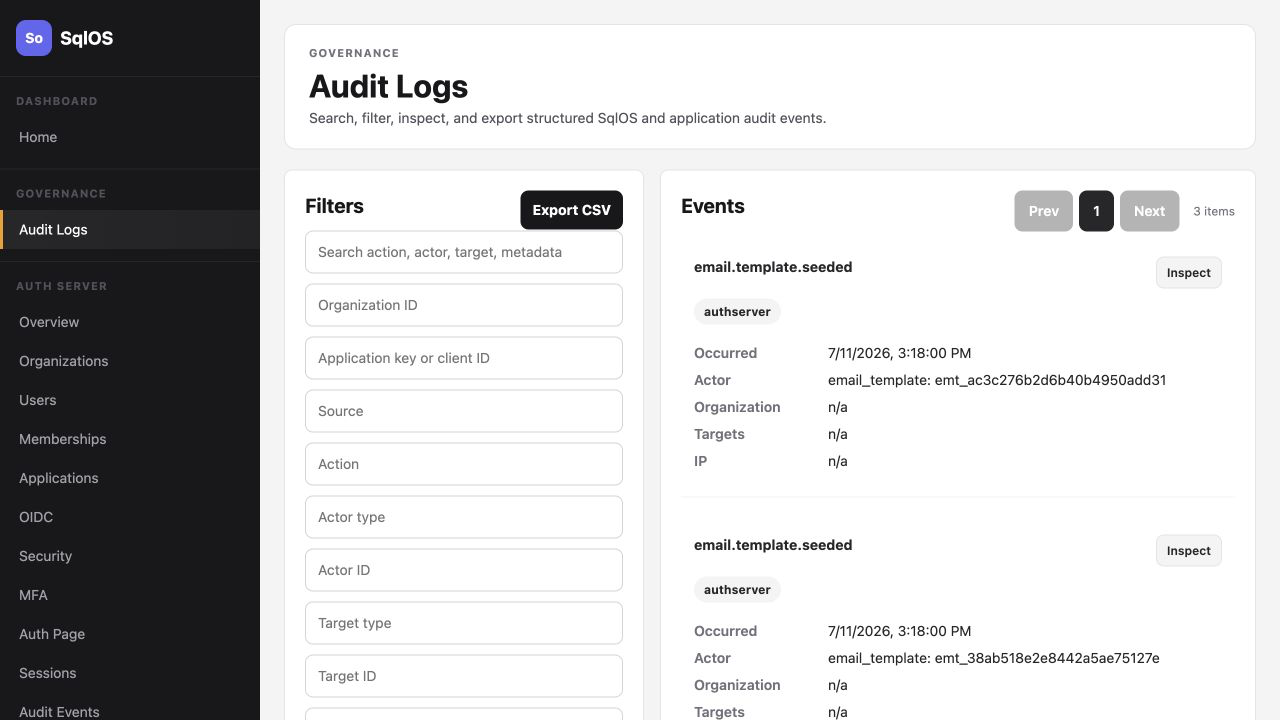
Use stable dot-delimited action names. Prefer past-tense or outcome-specific names:
| Good | Avoid |
|---|---|
retail.chain.created | create |
retail.inventory_item.updated | item changed |
document.shared | share document button clicked |
application.access.denied | error |
Keep action names stable because operators filter and export by action.
The actor is the principal that performed the action.
Never accept an actor id, actor display name, or organization id from the request body. For a SqlOS-protected endpoint, read them from GetSqlOSValidatedToken() after access-token validation. For another authentication scheme, resolve them from the authenticated server-side principal or session. The request DTO should contain business input only.
Common actor types:
userclientservice_accountagentdashboardsystemTargets are the affected resources. A single operation can have multiple targets:
Targets:
[
    new SqlOSAuditTarget("location", location.Id, location.Name),
    new SqlOSAuditTarget("inventory_item", item.Id, item.Name)
]Inject ISqlOSAuditLogService into the endpoint, controller, or domain service that performs the mutation. Mount the endpoint under a declared Api surface so it can read the validated token. Scope the resource to that trusted organization and authorize the mutation before changing state.
var inventoryApi = app.MapGroup("/api");

inventoryApi.MapPut("/locations/{locationId}/inventory/{itemId}", async (
    string locationId,
    string itemId,
    UpdateInventoryRequest request,
    InventoryDbContext db,
    ISqlOSFgaAuthService fga,
    ISqlOSAuditLogService auditLogs,
    HttpContext httpContext,
    CancellationToken ct) =>
{
    var token = httpContext.GetSqlOSValidatedToken();
    if (token?.UserId is not { Length: > 0 } userId)
    {
        return Results.Unauthorized();
    }

    if (token.OrganizationId is not { Length: > 0 } organizationId)
    {
        return Results.Forbid();
    }

    var item = await db.InventoryItems
        .SingleOrDefaultAsync(x =>
            x.Id == itemId &&
            x.LocationId == locationId &&
            x.OrganizationId == organizationId,
            ct);
    if (item is null)
    {
        return Results.NotFound();
    }

    var access = await fga.CheckAccessAsync(
        userId,
        RetailPermissionKeys.InventoryEdit,
        item.ResourceId);
    if (!access.Allowed)
    {
        return Results.Forbid();
    }

    var previousQuantity = item.QuantityOnHand;
    item.QuantityOnHand = request.QuantityOnHand;
    await db.SaveChangesAsync(ct);

    await auditLogs.RecordAsync(new SqlOSAuditLogRecordRequest(
        Action: "retail.inventory_item.updated",
        OrganizationId: organizationId,
        ApplicationKey: "northwind-retail",
        Source: "application",
        Actor: new SqlOSAuditActor(
            "user",
            userId,
            token.Principal.Identity?.Name),
        Targets:
        [
            new SqlOSAuditTarget("location", locationId),
            new SqlOSAuditTarget("inventory_item", item.Id, item.Name)
        ],
        Context: SqlOSAuditContext.FromHttpContext(httpContext),
        Metadata: new Dictionary<string, object?>
        {
            ["result"] = "success",
            ["sku"] = item.Sku,
            ["previousQuantity"] = previousQuantity,
            ["newQuantity"] = item.QuantityOnHand,
            ["delta"] = item.QuantityOnHand - previousQuantity
        }),
        ct);

    return Results.Ok(item);
});

public sealed record UpdateInventoryRequest(int QuantityOnHand);
This example uses a representative host-owned InventoryItem model with an explicit OrganizationId. The query binds the resource to the token's organization, then the FGA check proves the same actor may edit that resource. If your schema derives tenancy from a parent or FGA root instead, resolve and verify that trusted ownership mapping before mutation and use the resolved organization in the audit row. A valid token alone is not authorization. SqlOS generates the audit event id; this ordinary write does not need an idempotency key.
SaveChangesAsync followed by RecordAsync is two writes, not one atomic operation. A process failure between them can commit the business change without its audit event. If that event cannot be lost, commit the mutation and audit row in one application transaction when both use the same database context, or write an outbox record in the mutation transaction and publish it to RecordAsync with a stable idempotency key.
Use ApplicationKey for the product surface that produced the event. If the key matches a registered SqlOS client id, SqlOS also links the event to that client row.
IdempotencyKey is optional. Omit it for ordinary audit writes; SqlOS generates a unique event id and records every call. Set it only when the caller may deliver the same business operation more than once and needs those retries to converge on one event, such as an outbox worker. SqlOS cannot infer whether two calls are retries or two legitimate operations, so this stable operation identifier must come from the retrying workflow.
When supplied, SqlOS hashes the key together with the normalized organization, resolved application, source, and exact action. A duplicate inside that exact namespace returns the original event instead of inserting another row; the same key in another scope creates an independent event.
Good idempotency keys usually include:
share:{shareOperationId}Do not generate a fresh request or trace id for each retry. The scope fields are already part of the namespace, so they do not need to be repeated in the key. Always derive organization and application scope from trusted server-side state; a retry returns an existing event only when all scope fields match.
Never include passwords, access tokens, refresh tokens, API keys, client secrets, raw authorization headers, cookies, private keys, raw stack traces, request bodies, or response bodies.
Metadata should explain the decision or outcome without exposing sensitive data:
Metadata: new Dictionary<string, object?>
{
    ["result"] = "denied",
    ["reason"] = "missing_permission",
    ["permission"] = "inventory.edit"
}Open:
/sqlos/admin/audit/logsUseful filters:
| Filter | Example |
|---|---|
| Application | northwind-retail |
| Source | application |
| Action | retail.inventory_item.updated |
| Actor type | user |
| Target type | inventory_item |
| Result | success or denied |
Select a row to inspect actor, targets, context, and metadata.
Use the dashboard export button. The CSV endpoint is protected by the same admin authorization as /sqlos/admin; it is not a public reporting API.
Exports use the same filters as the dashboard list. SqlOS caps dashboard exports at 5,000 rows and a 366-day date range. If no dates are supplied, export defaults to the last 30 days.
After a mutation, the Audit Logs dashboard shows:
Source = applicationIn the Retail example, create or edit a chain, store, or inventory item and filter Audit Logs by northwind-retail.