Clients
Choose the right client onboarding path for owned apps, portable clients, and compatibility clients.
A client is the app that sends a user into SqlOS sign in and later exchanges the auth code for tokens.
SqlOS supports four client onboarding paths:
CIMD when the client_id is a stable HTTPS metadata documentDCR for public clients that still expect runtime registrationIf you are unsure, start with the first path.
For a one-app setup, use Single-Application Setup before reaching for explicit client seeding.
This is the default path for most teams.
Use it for:
Open Auth Server > Clients.
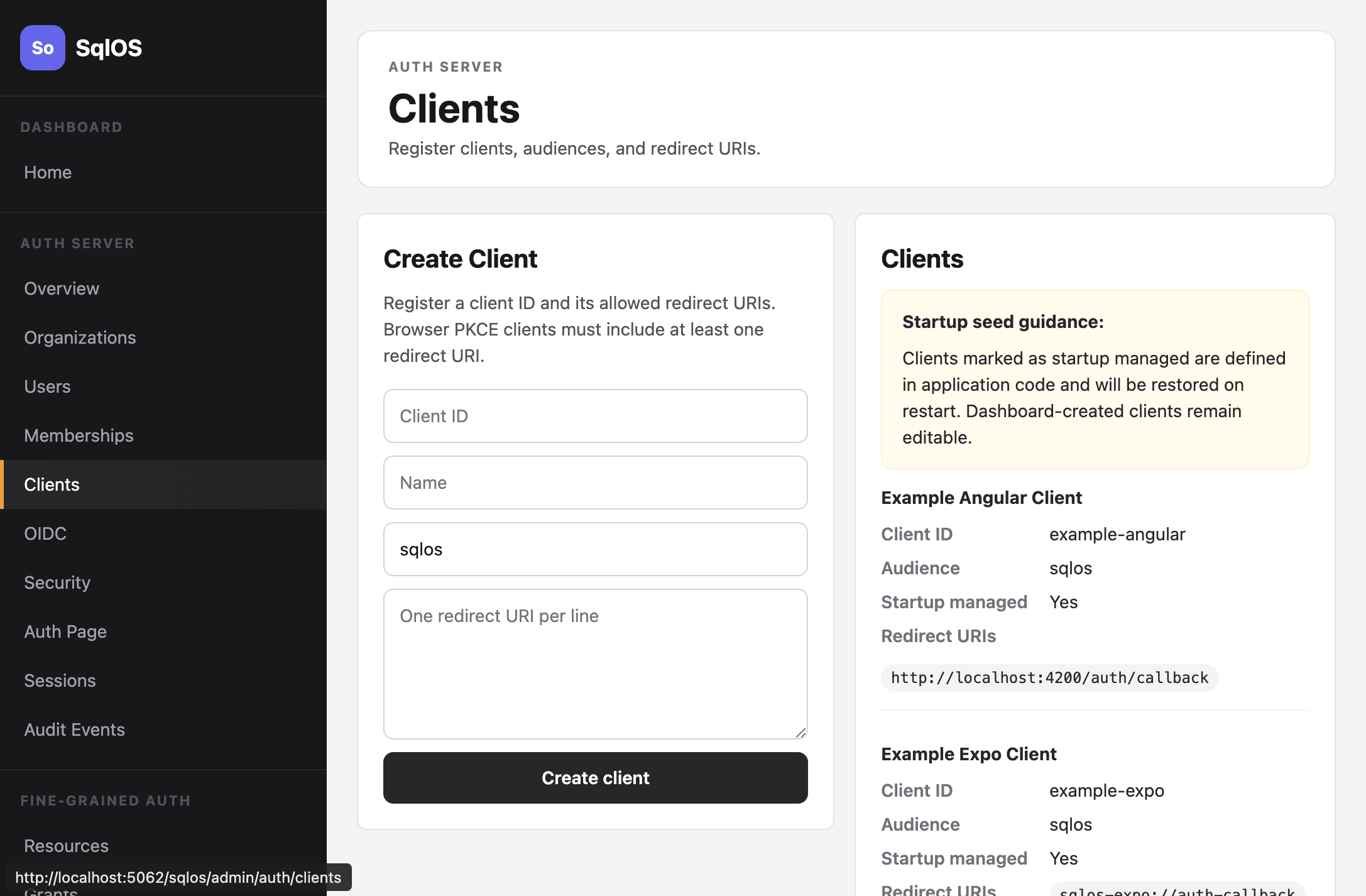
Recommended for first-party apps:
builder.AddSqlOS<AppDbContext>(options =>
{
    options.AuthServer.SeedOwnedWebApp(
        "my-web-app",
        "My Web Application",
        "http://localhost:3000/auth/callback",
        "https://app.example.com/auth/callback");
});
SeedOwnedWebApp and SeedBrowserClient register redirect URIs only. They leave AllowedScopes empty. Set the allowlist explicitly with SeedClient (or the dashboard / Admin API) when the app will send a scope query on /authorize. Headless and hosted first-party apps should do both: put openid profile email on the client, and send the same scope on the authorize request. User access tokens do not carry a scope claim today; the pair still matters because OpenID Provider mode mints an ID token only when openid ends up in the granted set — allowlisted and requested — and silently omits it otherwise.
The dashboard and Admin API surface a computed emptyAllowlistWarning when a user-facing client has an empty allowlist. Code-owned records show the same warning and must be fixed in the seed, not by overwriting ownership from the dashboard.
openid is never always-allowed. With OpenID Provider mode enabled (the default), a client receives an id_token only when openid is both on its allowlist and requested on the grant. The dashboard and Admin API surface a computed omittedOpenIdWarning when a user-facing client allowlist omits openid, including empty allowlists. Code-owned records show the same warning and must be fixed in the seed. Omitting openid on /authorize is valid OAuth and does not fail the request; hosted and headless pages set a non-blocking info signal when the allowlist includes openid but the grant does not.
curl -X POST http://localhost:5062/sqlos/admin/auth/api/clients \
  -b "$SQLOS_DASHBOARD_COOKIE_JAR" \
  -H "Content-Type: application/json" \
  -d '{
    "clientId": "my-web-app",
    "name": "My Web Application",
    "audience": "sqlos",
    "redirectUris": ["http://localhost:3000/auth/callback"],
    "isFirstParty": true
  }'
The Admin API requires an operator session; see Authenticate operator API calls.
| Field | Required | Description |
|---|---|---|
clientId | Yes | Unique identifier (e.g., my-web-app) |
name | Yes | Display name |
audience | No | Token audience claim |
redirectUris | Yes | Allowed callback URIs for OAuth flows |
allowedScopes | No | Scopes this client may be granted. Set this to the same values the app sends on /authorize. An empty list grants nothing. |
isFirstParty | No | Defaults to false. Set true only for an app you own: first-party clients skip the consent screen and may use the direct sign-in APIs. |
AllowedScopes is an allowlist on every grant. Authorization-code, device, and client-credentials requests grant only the intersection of the requested scopes and this list. Unknown requested scopes are dropped, not rejected. The grant may be empty.
An empty allowlist is deny-all, not a wildcard. Seeded and dashboard-created clients that omit the list therefore receive no requested scopes until an operator sets one. Dynamic Client Registration stores [] unless the registration request includes scope.
Use a confidential client when the OAuth callback and refresh-token exchange run
in server-side code that can protect a secret. SqlOS then requires the
client's registered method (client_secret_basic by default, or
client_secret_post) for both the authorization-code and refresh grants. Refresh
a confidential client's token only at POST /sqlos/auth/token. The JSON
/token/refresh route and in-process RefreshAsync reject it with
invalid_client because they carry no client credentials. Public browser,
native, and CLI clients continue to use PKCE without a secret. Their refresh
requests are identified by the refresh token itself;
client_id is optional on grant_type=refresh_token and is not client
authentication.
The credential belongs to the OAuth client. Creating a confidential client for
authorization-code or refresh does not create an FGA service account, and it
does not enable client_credentials.
A machine client is a different AuthServer
shape: confidential, client_secret_basic, and client_credentials, with no
user session. Use SeedMachineClient or Auth Server > Machine Clients when
a worker also needs an FGA subject and grants. That binding is optional; an FGA
service account is not an OAuth client.
For code-owned configuration, resolve the secret from the host's existing secret provider:
options.AuthServer.SeedClient(client =>
{
    client.ClientId = "billing-server";
    client.Name = "Billing Server";
    client.ClientType = "confidential";
    client.RedirectUris = ["https://billing.example.com/auth/callback"];
    client.AllowedScopes = ["openid", "profile", "offline_access"];
    client.ClientSecretResolver = () =>
        builder.Configuration["SqlOS:Clients:BillingServer:Secret"];
});
Secrets must contain 43 to 256 characters. Startup fails closed when a confidential code-owned client cannot resolve exactly one plaintext secret or compatible password hash. SqlOS stores only the slow hash.
In the dashboard, choose Owned Server Web, create the client, and copy the generated secret from the one-time reveal. The equivalent admin API flow is:
POST /sqlos/admin/auth/api/clients with
"clientType": "confidential";POST /sqlos/admin/auth/api/clients/{id}/credentials;clientSecret before leaving the response.Credential list responses contain only metadata. Create a second credential for
a deployment overlap window, move callers to it, and then revoke the old
credential. Authentication failures return a generic invalid_client response
and do not consume the authorization code or refresh token.
Use the CLI / Device OAuth dashboard preset or seed a CLI client:
builder.AddSqlOS<AppDbContext>(options =>
{
    options.AuthServer.SeedCliClient(
        "acme-cli",
        "Acme CLI",
        "https://api.acme.com",
        "openid",
        "profile",
        "email",
        "offline_access");
});
CLI clients are public clients. They do not require redirect URIs and are allowed to use:
urn:ietf:params:oauth:grant-type:device_coderefresh_tokenSee CLI OAuth for the complete flow and polling rules.
Clients seeded in startup code are marked as startup managed. Their configuration is reapplied on every restart, so changes made in the dashboard will be overwritten.
Dashboard-created clients are fully editable and persist across restarts.
SqlOS can reuse an existing issuer session without asking the user to
enter a primary credential again, but only for clients marked as first-party.
Owned clients created with SeedOwnedWebApp, SeedOwnedNativeApp, or the
single-application setup are first-party automatically.
That reuse is the usual "I clicked Sign out, then Sign in, and skipped AuthPage"
bug. Sign-out that only deletes access and refresh tokens leaves the
sqlos_auth_page cookie. The next /authorize for a first-party client
completes immediately unless you send prompt=login or first call
GET /sqlos/auth/logout. view=login and view=signup do not override this.
See Refresh and Logout.
Before issuing a new authorization code, SqlOS always re-evaluates the current
organization, membership, and MFA policy. A request bound to an organization
uses that organization rather than the organization remembered by the browser
session. If organization selection or MFA is required, the user sees that step
instead of receiving a code. With prompt=none, SqlOS returns
interaction_required because the protocol forbids displaying the step.
Dynamically registered, CIMD, and other third-party clients require explicit
user consent on their first authorization: the user sees the
consent screen before SqlOS issues the code. After
the user approves, the remembered grant lets later authorizations with covered
scopes complete silently, exactly like first-party clients. prompt=none
returns consent_required only when no covering grant exists. The
client-controlled-URL protection is preserved because the first grant always
requires an explicit user gesture; an unrelated signed-in browser session alone
never produces a code for a third-party client. Do not set IsFirstParty for
an application you do not own and trust.
SqlOS's direct sign-in APIs return tokens to the caller instead of redirecting a browser, so there is no page where a consent screen could appear. Only first-party clients may use them:
POST /sqlos/auth/password/login and POST /sqlos/auth/signupPOST /sqlos/auth/email-otp/start and /email-otp/verifyPOST /sqlos/auth/magic-link/start and /magic-link/completePOST /sqlos/auth/select-organization and the /mfa/challenge/* completionsPOST /sqlos/auth/oidc/authorization-url and POST /sqlos/auth/oidc/exchange,
the app-owned social provider chooser (SqlOSOidcBrowserAuthService)SqlOSAuthService methods, including the phone-code, email-code
signup, and invitation signup methods, CompleteExternalLoginAsync, and
CompleteClientAuthenticationAsyncA dynamically registered, CIMD, or other non-first-party client is refused
with 400 and { "error": "invalid_client" }, and the service methods throw
SqlOSPublicAuthException with the same error. The refusal happens before
SqlOS checks a password, sends an email or SMS, creates provider state, creates
an account, or mints a session. A code, link, or provider state issued before
the client lost first-party status is refused when it is redeemed. SqlOS
records one oauth.direct_login.rejected audit event with the client_id and
the request route. Third-party clients sign users in through /authorize,
where the consent screen runs, including for social and SAML sign-in.
SeedBrowserClient, SeedOwnedWebApp, SeedOwnedNativeApp, SeedCliClient,
the single-application setup, and the dashboard's owned-app and CLI templates
create first-party clients. SeedClient, the Admin API, and the dashboard's
other templates default to IsFirstParty = false. Set it to true on a client
your own backend uses with the direct sign-in APIs.
Custom headless browser UIs should forward both PendingToken and MfaToken
from BuildUiUrl. The former carries organization selection; the latter carries
an MFA step-up into the headless request view. The official examples include
both automatically.
Use CIMD when a public client uses a stable HTTPS client_id that points to its own metadata document.
This is the better long-term public-client story because the client keeps its own metadata and SqlOS can fetch and cache it.
Enable it with:
builder.AddSqlOS<AppDbContext>(options =>
{
    options.AuthServer.ClientRegistration.Cimd.Enabled = true;
});
That path is especially useful for:
Use DCR only when a real client still expects runtime registration.
Enable it with:
builder.AddSqlOS<AppDbContext>(options =>
{
    options.AuthServer.ClientRegistration.Dcr.Enabled = true;
});
SqlOS keeps this path intentionally narrow in v1:
token_endpoint_auth_method=noneAllowedScopes list ([]), which grants no requested scopes until an operator or a later registration change populates an allowlistRegister separate clients for each frontend. The example stack seeds three:
auth.SeedClient(client =>
{
    client.ClientId = "example-web";
    client.Name = "Example Web";
    client.ClientType = "public_pkce";
    client.RequirePkce = true;
    client.IsFirstParty = true;
    client.AllowedScopes = ["openid", "profile", "email", "offline_access"];
    client.RedirectUris =
    [
        "http://localhost:3010/auth/callback",
        "http://localhost:3010/api/auth/callback/sqlos"
    ];
});
auth.SeedClient(client =>
{
    client.ClientId = "example-angular";
    client.Name = "Example Angular";
    client.ClientType = "public_pkce";
    client.RequirePkce = true;
    client.IsFirstParty = true;
    client.AllowedScopes = ["openid", "profile", "email", "offline_access"];
    client.RedirectUris = ["http://localhost:4200/auth/callback"];
});
auth.SeedClient(client =>
{
    client.ClientId = "example-expo";
    client.Name = "Example Expo";
    client.ClientType = "public_pkce";
    client.RequirePkce = true;
    client.IsFirstParty = true;
    client.AllowedScopes = ["openid", "profile", "email", "offline_access"];
    client.RedirectUris = ["sqlos-expo://auth-callback"];
});
First-party JS clients that request openid (Auth.js idToken: true, angular-oauth2-oidc, expo-auth-session) must set AllowedScopes. SeedOwnedWebApp and SeedOwnedNativeApp still register only the redirect URI and leave the allowlist empty.
Dashboard-created and dynamically registered clients keep ordinary Disable / Enable on the Clients page and POST /sqlos/admin/auth/api/clients/{id}/disable|enable.
A startup-seeded client is code-owned. Ordinary disable/enable is rejected. Use Emergency disable / Emergency enable, which persist oauth_client_emergency_disabled and survive the next seed reconcile. That override is not the same as disabled_by_operator or application_access_disabled. If the seed created the client inactive, change IsActive in source control; emergency enable will not override that.
Session revoke remains available for every owner.