Assign access across multiple apps
Decide which organizations, roles, and users can enter each client application.
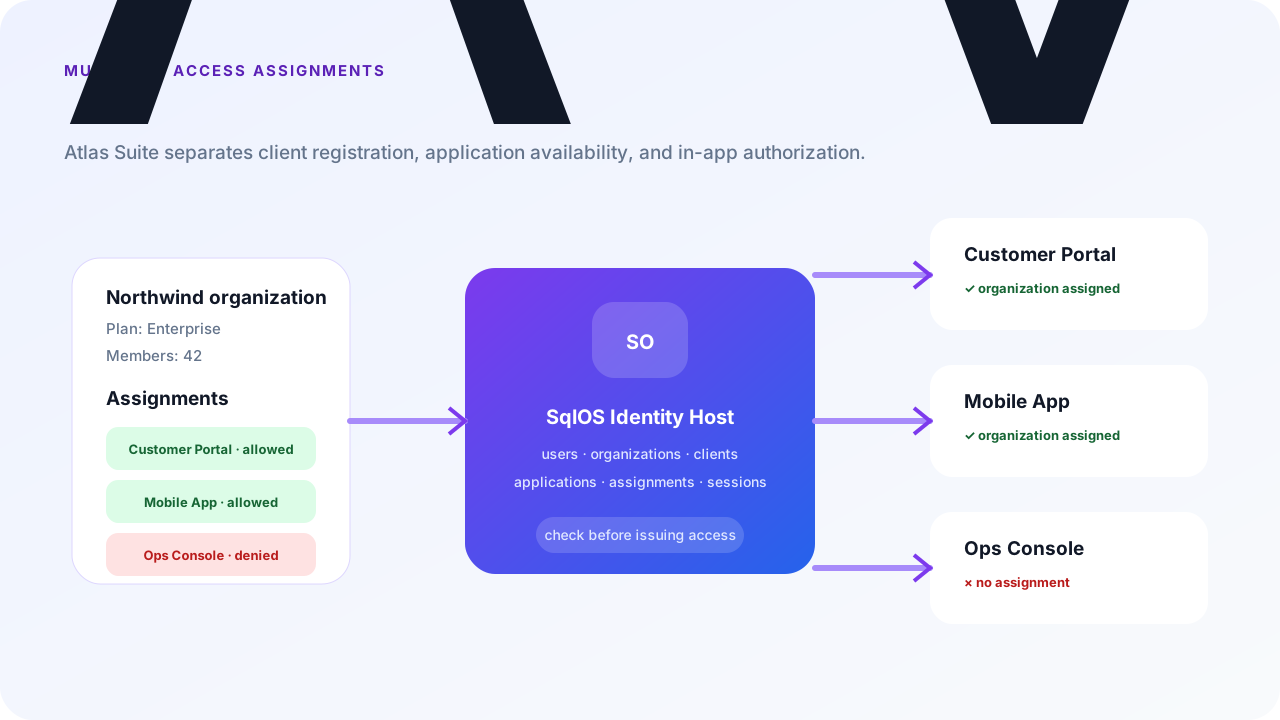
This guide builds Atlas Suite, a fictional B2B product with one identity host and three clients:
All three can call the same API. Client registration identifies the app, OAuth audience identifies the API, and application assignments identify who may use the app. These are separate controls.
For the Northwind organization:
| Person | Customer Portal | Field Mobile | Ops Console |
|---|---|---|---|
| Member | Allowed | Allowed | Denied |
| Admin | Allowed | Allowed | Allowed |
| Explicitly denied admin | Allowed | Allowed | Denied |
The final row demonstrates deny precedence: a specific deny wins over organization, role, and default allows.
Use one stable client ID and exact callback list per surface. This example gives all three tokens the same https://api.atlas.test audience while retaining separate application policy.
builder.AddSqlOS<AppDbContext>(db => db.UseSqlServer(connectionString), options =>
{
    options.ConfigureApplication("Atlas Suite", application =>
    {
        application.Origin = "https://identity.atlas.test";
        application.Brand(page => page.PrimaryColor = "#0f172a");
    });
    var auth = options.AuthServer;
    auth.PublicOrigin = "https://identity.atlas.test";
    auth.Issuer = "https://identity.atlas.test/sqlos/auth";

    auth.SeedClient(client =>
    {
        client.ClientId = "atlas-customer-portal";
        client.Name = "Atlas Customer Portal";
        client.Audience = "https://api.atlas.test";
        client.RedirectUris = ["https://portal.atlas.test/auth/callback"];
        client.AllowedScopes = ["openid", "profile", "email", "offline_access"];
        client.RequirePkce = true;
        client.IsFirstParty = true;
        client.AccessMode = SqlOSApplicationAccessModes.SelectedOrganizations;
        client.AssignOrganization("northwind-subscription", "northwind",
            description: "Northwind enterprise subscription");
    });

    auth.SeedClient(client =>
    {
        client.ClientId = "atlas-field-mobile";
        client.Name = "Atlas Field Mobile";
        client.Audience = "https://api.atlas.test";
        client.RedirectUris = ["https://app.atlas.test/auth/callback"];
        client.AllowedScopes = ["openid", "profile", "email", "offline_access"];
        client.RequirePkce = true;
        client.IsFirstParty = true;
        client.AllowNativeHeadlessAuth = true;
        client.AccessMode = SqlOSApplicationAccessModes.SelectedOrganizations;
        client.AssignOrganization("northwind-mobile", "northwind",
            description: "Northwind mobile entitlement");
    });

    auth.SeedClient(client =>
    {
        client.ClientId = "atlas-ops-console";
        client.Name = "Atlas Ops Console";
        client.Audience = "https://api.atlas.test";
        client.RedirectUris = ["https://ops.atlas.test/auth/callback"];
        client.AllowedScopes = ["openid", "profile", "email", "offline_access"];
        client.RequirePkce = true;
        client.IsFirstParty = true;
        client.AccessMode = SqlOSApplicationAccessModes.SelectedUsersGroupsRoles;
        client.AssignRole("northwind-admins", "northwind", "admin",
            description: "Northwind administrators");
    });
});
northwind is a stable organization ID or slug that must already exist. Startup resolves it, applies the restrictive mode before the host accepts traffic, and fails closed if the organization or principal is missing or inactive. If you omit AccessMode and assignments, new clients use all_organizations and existing seeded clients retain their stored mode.
Assignment keys such as northwind-mobile are application-owned identities, not database row IDs. SqlOS reconciles only rows owned by that key. Dashboard-created assignments coexist with them and survive restart; removing a keyed seed revokes only its code-owned row and records an audit event.
Open Auth Server > Clients and select each app to inspect the effective policy. For Atlas Suite:
| Client | Mode | Meaning |
|---|---|---|
atlas-customer-portal | selected_organizations | Contracted organizations only |
atlas-field-mobile | selected_organizations | Mobile-entitled organizations only |
atlas-ops-console | selected_users_groups_roles | Only explicit people, groups, or org roles |
For dashboard-owned clients, the same change is available from a trusted admin process:
await admin.SetApplicationAccessModeAsync(
    "atlas-customer-portal",
    new SqlOSSetApplicationAccessModeRequest(
        SqlOSApplicationAccessModes.SelectedOrganizations),
    actorType: "deployment",
    actorId: "atlas-access-v1",
    cancellationToken: ct);
Code-owned access modes are read-only in the dashboard. Operators may still add dashboard-owned exception assignments; startup reconciliation never adopts or removes them. For fully programmable, operator-owned policy, AssignApplicationAsync remains available and creates a new dashboard-owned assignment on each call.
Create an organization allow assignment for both customer-facing clients:
var northwindAccess = new SqlOSCreateApplicationAssignmentRequest(
    PrincipalType: SqlOSApplicationAssignmentPrincipalTypes.Organization,
    OrganizationId: "org_northwind",
    Access: SqlOSApplicationAssignmentAccess.Allowed,
    Reason: "Northwind enterprise subscription");

await admin.AssignApplicationAsync(
    "atlas-customer-portal",
    northwindAccess,
    actorType: "deployment",
    actorId: "atlas-access-v1",
    cancellationToken: ct);

await admin.AssignApplicationAsync(
    "atlas-field-mobile",
    northwindAccess,
    actorType: "deployment",
    actorId: "atlas-access-v1",
    cancellationToken: ct);
Organization assignments are the only assignment type to use with selected_organizations.
Role matching uses the active SqlOSMembership.Role value and is scoped to one organization. If your membership role is admin, assign exactly that key:
await admin.AssignApplicationAsync(
    "atlas-ops-console",
    new SqlOSCreateApplicationAssignmentRequest(
        PrincipalType: SqlOSApplicationAssignmentPrincipalTypes.Role,
        OrganizationId: "org_northwind",
        RoleKey: "admin",
        Access: SqlOSApplicationAssignmentAccess.Allowed,
        Reason: "Northwind administrators operate their workspace"),
    actorType: "deployment",
    actorId: "atlas-access-v1",
    cancellationToken: ct);
You can also assign a single user, an FGA group, a service account, or an agent. Use the narrowest principal that matches the product rule.
An explicit deny is evaluated before every allow path, including all_organizations:
await admin.AssignApplicationAsync(
    "atlas-ops-console",
    new SqlOSCreateApplicationAssignmentRequest(
        PrincipalType: SqlOSApplicationAssignmentPrincipalTypes.User,
        PrincipalId: "usr_alex",
        Access: SqlOSApplicationAssignmentAccess.Denied,
        Reason: "Operations access suspended during review"),
    actorType: "security",
    actorId: "case_2841",
    cancellationToken: ct);
Do not use denies as a substitute for a clear allow model. They are best for bounded exceptions and incident response, with a reason and an owner.
A user, group, service-account, or agent assignment matches its principal across the whole client; adding an OrganizationId does not scope that principal match. Organization-role assignments are the path for a rule such as “admins of Northwind.”
Check the matrix with the backend API:
var member = await admin.CheckApplicationAccessAsync(
    "atlas-ops-console",
    userId: "usr_member",
    organizationId: "org_northwind",
    cancellationToken: ct);

var administrator = await admin.CheckApplicationAccessAsync(
    "atlas-ops-console",
    userId: "usr_admin",
    organizationId: "org_northwind",
    cancellationToken: ct);
The result returns Allowed, Decision, AccessMode, Source, the matching assignment, and its reason. Treat this as an admin/support explanation surface; do not expose organization or assignment details from a public login page.
Available-app views can use the trusted admin methods or routes for an organization or user:
GET /sqlos/admin/auth/api/organizations/org_northwind/applications
GET /sqlos/admin/auth/api/users/usr_admin/applicationsSqlOS checks application access during hosted and headless authorization, social and SAML callbacks, Email OTP session issuance, device approval, refresh, and token creation. Public failures deliberately return only Application access is not allowed.
Revoking an assignment prevents new authorization and refresh. An already-issued short-lived access token remains valid until expiry unless you also revoke the client's sessions or disable the client. Resource APIs must still validate the exact audience and perform FGA or business authorization for each operation.
Setting disabled also deactivates the client and revokes its sessions. Changing to another mode later does not re-enable it; explicitly call EnableClientAsync or use the dashboard.
all_organizations.application.assignment.* and application.access.*_denied audit events.Northwind members can enter the portal and mobile app, only Northwind admins can enter Ops, and a specific security deny still wins. Every app shares identity without accidentally sharing availability policy.