Run a standalone identity server
Configure SqlOS as a dedicated auth host for several web, mobile, CLI, and API surfaces.
Standalone SqlOS adds a control plane: multiple clients, assignments, headless UI routing, and resource API validation. Start with single-application setup unless you already have more than one app surface.
By the end of this guide you will have:
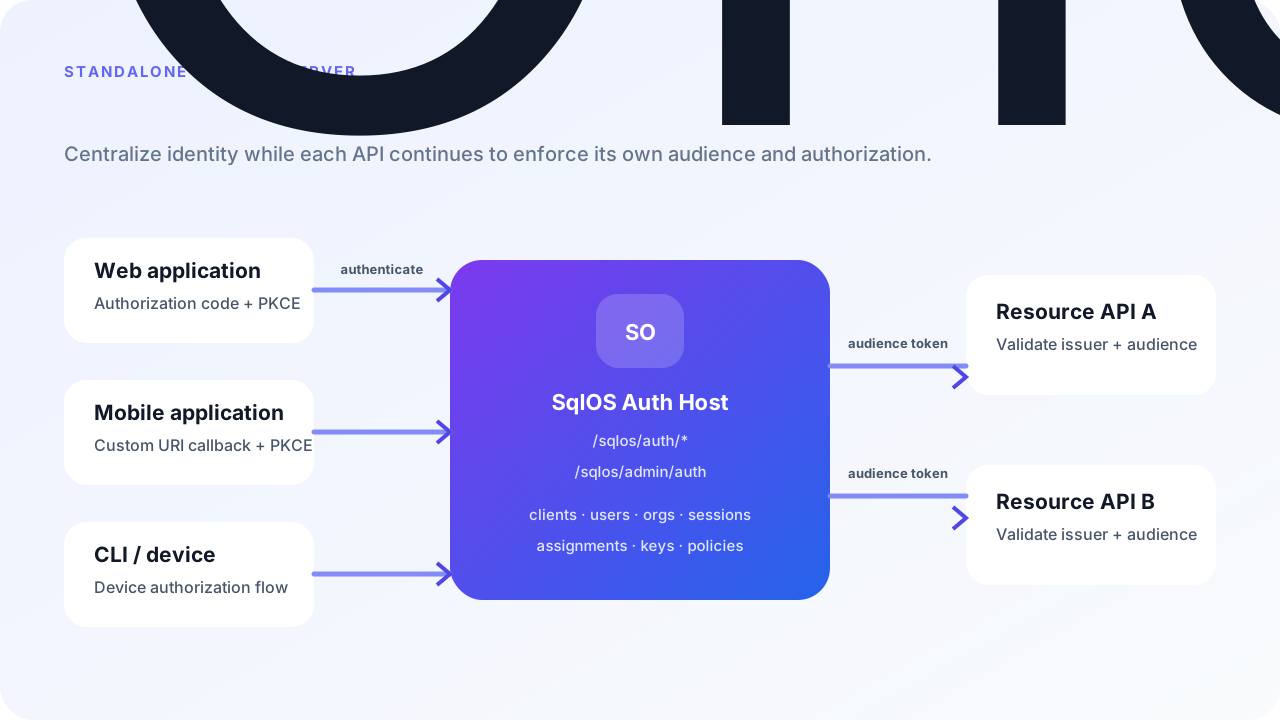
This complete host describes the application once and registers its clients explicitly. Supply the connection string and dashboard password through the host's configuration or secret store.
using Microsoft.EntityFrameworkCore;
using SqlOS;
using SqlOS.Configuration;
using SqlOS.Extensions;

var builder = WebApplication.CreateBuilder(args);
var connectionString = builder.Configuration.GetConnectionString("DefaultConnection")
    ?? throw new InvalidOperationException("Configure ConnectionStrings:DefaultConnection.");
var dashboardPassword = builder.Configuration["SqlOS:Dashboard:Password"]
    ?? throw new InvalidOperationException("Configure SqlOS:Dashboard:Password.");
const string identityOrigin = "https://auth.example.com";
const string apiAudience = "https://api.example.com";

builder.AddSqlOS<ExampleAppDbContext>(db => db.UseSqlServer(connectionString), options =>
{
    options.ConfigureApplication("Acme Identity", application =>
    {
        application.Origin = identityOrigin;
        application.Brand(page => page.PrimaryColor = "#0f172a");
    });
    options.Dashboard.AuthMode = SqlOSDashboardAuthMode.Password;
    options.Dashboard.Password = dashboardPassword;

    var auth = options.AuthServer;
    auth.PublicOrigin = identityOrigin;
    auth.Issuer = identityOrigin + "/sqlos/auth";
    auth.DefaultAudience = apiAudience;

    foreach (var (id, name, redirect) in new[]
    {
        ("customer-portal", "Customer Portal", "https://app.example.com/auth/callback"),
        ("admin-console", "Admin Console", "https://admin.example.com/auth/callback"),
        ("mobile-app", "Mobile App", "sqlos-mobile://auth-callback")
    })
    {
        auth.SeedClient(client =>
        {
            client.ClientId = id;
            client.Name = name;
            client.RedirectUris = [redirect];
            client.Audience = apiAudience;
            client.AllowedScopes = ["openid", "profile", "email", "offline_access"];
            client.ClientType = "public_pkce";
            client.RequirePkce = true;
            client.IsFirstParty = true;
        });
    }
    auth.SeedCliClient("support-cli", "Support CLI", apiAudience,
        "openid", "profile", "email", "offline_access");
});

var app = builder.Build();
app.Run();

public sealed class ExampleAppDbContext(DbContextOptions<ExampleAppDbContext> options)
    : SqlOSDbContext<ExampleAppDbContext>(options);
ConfigureApplication seeds no client. Brand, Headless, and Authorization use the same settings and reconciliation as the single-application API. This dedicated host has no local business API, so it does not declare Api. Each separate resource API validates its own audience.
The public issuer must be stable. Each browser application configures its standard OIDC library with https://auth.example.com/sqlos/auth as the authority and the exact registered callback. Hosted AuthPage and headless UI use the same authorization-code flow.
The complete program above registers these applications:
| Client | Callback or grant | Audience |
|---|---|---|
customer-portal | https://app.example.com/auth/callback | https://api.example.com |
admin-console | https://admin.example.com/auth/callback | https://api.example.com |
mobile-app | sqlos-mobile://auth-callback | https://api.example.com |
support-cli | Device authorization | https://api.example.com |
Add registrations inside the existing AddSqlOS callback, or use the dashboard/admin API with separate operator-owned records. Startup reconciliation preserves ownership. Use IsFirstParty = false for a partner application that should request consent (it then signs users in only through /authorize, because the direct sign-in APIs are first-party only), and resolve confidential-client secrets through the host's secret mechanism. The multiple-applications guide links runnable retail, Todo, and standalone-provider examples.
Client IDs identify the app asking for login. Audience identifies the resource API that should accept the access token. Two clients can use the same audience and still have different application access policy.
Use hosted AuthPage when a shared login page is acceptable.
Use headless when your frontend should own the login UI while SqlOS owns OAuth state. Add this inside the ConfigureApplication callback above; the callback form supports a UI on a different origin.
application.Headless(headless =>
{
    headless.BuildUiUrl = ctx =>
        QueryHelpers.AddQueryString(
            "https://app.example.com/auth/authorize",
            new Dictionary<string, string?>
            {
                ["request"] = ctx.RequestId,
                ["view"] = ctx.View,
                ["email"] = ctx.Email,
                ["pendingToken"] = ctx.PendingToken,
                ["mfaToken"] = ctx.MfaToken,
                ["ui_context"] = ctx.UiContext?.ToJsonString()
            });
});
See Headless Auth and Hosted vs Headless.
For reproducible deployments, set AccessMode and stable keyed assignments on the existing SeedClient registration. The fragment below shows the access fields to add; do not register the same client twice. Referenced organizations and principals must already exist. The dashboard/API workflow below is the operator-owned alternative and remains useful for runtime exceptions.
auth.SeedClient(client =>
{
    client.ClientId = "admin-console";
    client.Name = "Admin Console";
    client.RedirectUris = ["https://admin.example.com/auth/callback"];
    client.AccessMode = SqlOSApplicationAccessModes.SelectedUsersGroupsRoles;
    client.AssignRole("tenant-admins", "org_123", "admin");
});
Or restrict a dashboard-owned client through the admin API:
curl -X POST https://auth.example.com/sqlos/admin/auth/api/applications/admin-console/access-mode \
  -b "$SQLOS_DASHBOARD_COOKIE_JAR" \
  -H "Content-Type: application/json" \
  -d '{ "accessMode": "selected_users_groups_roles" }'
Allow tenant admins for one organization:
curl -X POST https://auth.example.com/sqlos/admin/auth/api/applications/admin-console/assignments \
  -b "$SQLOS_DASHBOARD_COOKIE_JAR" \
  -H "Content-Type: application/json" \
  -d '{
    "principalType": "role",
    "organizationId": "org_123",
    "roleKey": "admin",
    "access": "allowed",
    "reason": "Tenant admins may use Admin Console"
  }'
Explain a decision:
curl -b "$SQLOS_DASHBOARD_COOKIE_JAR" \
  "https://auth.example.com/sqlos/admin/auth/api/applications/admin-console/access/check?organizationId=org_123&userId=usr_123"
These routes require the standalone host's operator authentication. The cookie-jar variable follows Authenticate operator API calls; for production automation, prefer a separately authorized backend workflow.
Resource APIs should validate issuer, signature, expiry, and audience. They should not rely on application access checks alone.
builder.Services.AddAuthentication("Bearer").AddJwtBearer("Bearer", options =>
{
    options.Authority = "https://auth.example.com/sqlos/auth";
    options.Audience = "https://api.example.com";
    options.MapInboundClaims = false;
});
builder.Services.AddAuthorization();

var app = builder.Build();
app.UseAuthentication();
app.UseAuthorization();
app.MapGet("/me", (HttpContext http) => new { userId = http.User.FindFirst("sub")?.Value })
    .RequireAuthorization();
app.Run();
This separate API uses Microsoft.AspNetCore.Authentication.JwtBearer and validates signature, issuer, expiry, and audience through discovery/JWKS. It does not query SqlOS session state on each request. In a process that hosts SqlOS, declared Api/Mcp surfaces additionally validate the persisted session through SqlOS services; see token validation.
Use FGA or app policy after token validation when the API needs row-level or resource-level authorization.
Use the SDK services for flows that are not just browser redirect login.
var invite = await authService.CreateEmailInvitationAsync(
    new SqlOSCreateEmailInvitationRequest(
        organizationId,
        email: "alex@example.com",
        role: "admin",
        clientId: "admin-console",
        redirectUri: "https://admin.example.com/auth/callback"),
    httpContext,
ct);Open /sqlos/admin/auth, confirm all expected clients exist, and check their access modes.
Use Customer Portal, Admin Console, mobile callback, and CLI/device flow separately.
Use the access check endpoint before and after revoking an assignment.
Call the resource API with a token minted for the correct audience and with one minted for the wrong audience.
Tables for clients, access modes, assignment targets, endpoints, and enforcement points.
Assign applications to organizations, users, groups, and roles.
Owned apps, CLI clients, CIMD, and DCR paths.
AuthService, admin service, OTP, invitations, device flow, and token validation.