Authorize teams with FGA groups
Grant a role once to a team and resolve inherited access for every member.
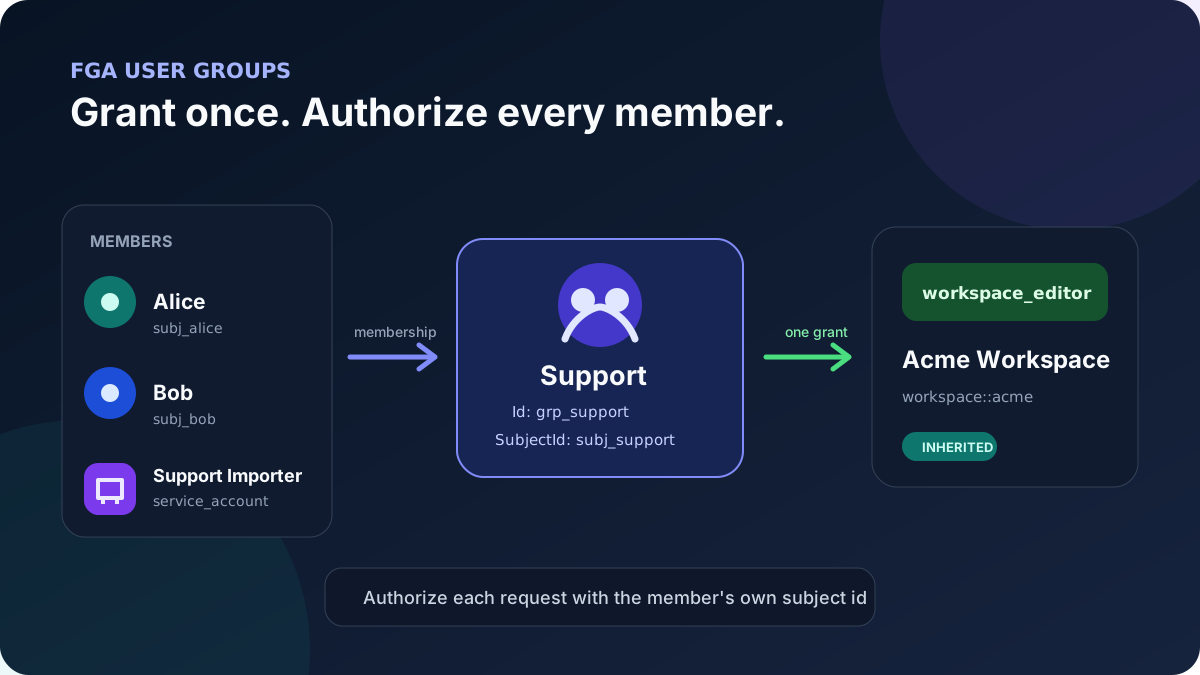
workspace.view and workspace.edit permissions already existworkspace_editor role contains both permissionsworkspace_reader role contains only workspace.view for the direct-grant coexistence checkInstead of creating one grant per person, represent a team as an FGA group:
Support team -- workspace_editor --> workspace::acme
       |
       +-- user Alice
       +-- user Bob
       +-- service account Support Importer
Every request still authorizes Alice, Bob, or the service account by its own subject id. SqlOS expands that subject to its groups at authorization time.
AuthServer organization memberships and FGA group memberships are different application relationships:
SqlOS does not automatically copy an AuthServer role or team into an FGA group. Synchronize only from a trusted application workflow after validating the actor, organization, and source-of-truth membership.
For an authenticated request, take the acting user and organization from GetSqlOSValidatedToken() or another trusted server-side session. Never let a browser body choose the acting subjectId, target groupId, role, or tenant.
This guide assumes the resolved FGA subject id is userSubjectId and the trusted organization id is organizationId. The tenant-owned example also assumes the user subject was provisioned with that OrganizationId; if your FGA subjects are global, validate membership through an application-owned user-to-organization table instead.
Inject ISqlOSFgaSubjectService and create the team:
var support = await subjectService.CreateGroupAsync(
    name: "Support",
    description: "People and services that operate the customer support workspace",
    groupType: "team",
    cancellationToken: ct);
The result deliberately has two identifiers:
| Identifier | Represents | Use it for |
|---|---|---|
support.Id | The membership container | AddToGroupAsync and RemoveFromGroupAsync |
support.SubjectId | The group as an authorization principal | GrantRoleAsync and access traces |
Pass support.Id when changing membership. Pass support.SubjectId when granting the group a role. They identify different rows and are not interchangeable.
CreateGroupAsync persists both the group subject and group record before returning.
CreateGroupAsync does not accept an organization id, and group authorization does not add a tenant predicate automatically. For a tenant-owned team, keep the group-to-organization relationship in application data or tag the generated group subject before exposing membership management:
var supportSubject = await db.Set<SqlOSFgaSubject>()
    .SingleAsync(subject => subject.Id == support.SubjectId, ct);

supportSubject.OrganizationId = organizationId;
await db.SaveChangesAsync(ct);
OrganizationId is metadata your trusted workflow can validate; CheckAccessAsync and group resolution do not enforce it for you. A global group may intentionally omit it, but a tenant-owned team needs an equivalent application-owned boundary.
Load both sides through the trusted organization boundary, then add the user's FGA subject id to the group container:
var memberExists = await db.Set<SqlOSFgaSubject>()
    .AnyAsync(subject =>
        subject.Id == userSubjectId &&
        subject.OrganizationId == organizationId,
        ct);

var groupExists = await db.Set<SqlOSFgaUserGroup>()
    .AnyAsync(group =>
        group.Id == support.Id &&
        group.Subject != null &&
        group.Subject.OrganizationId == organizationId,
        ct);

if (!memberExists || !groupExists)
{
    throw new InvalidOperationException("The member and group must belong to the trusted organization.");
}

await subjectService.AddToGroupAsync(
    userSubjectId,
    support.Id,
    ct);
The package's built-in member types are:
useragentservice_accountGroups cannot contain other groups. AddToGroupAsync explicitly rejects a subject whose type is group, and group resolution is intentionally one level deep, so there is no recursive or cyclic membership model to operate. The service does not act as a tenant guard or an allowlist for application-defined non-group subject types; if you seed custom subject types, decide their eligibility in the trusted wrapper.
The membership service saves its own changes. You do not need an additional SaveChangesAsync after AddToGroupAsync or RemoveFromGroupAsync.
Sequential retries are idempotent: a later add sees the existing composite membership row, and removing an absent row is a no-op. Two workers racing to add the same new membership can both pass the existence check before one wins the unique insert. Serialize reconciliation per subject/group or treat the duplicate-key loser as convergence after re-reading state.
Group creation, membership changes, and GrantRoleAsync do not form one transaction in this workflow: the subject service saves each create/add/remove operation, while the grant is saved separately below. Make reconciliation resumable so partial progress can safely converge.
Grant the role to the group's authorization subject, then save the new grant:
await db.GrantRoleAsync(
    support.SubjectId,
    resourceId: "workspace::acme",
    roleKeyOrId: "workspace_editor",
    cancellationToken: ct);

await db.SaveChangesAsync(ct);
GrantRoleAsync is idempotent for a normal replay after the earlier grant is visible, but it does not save automatically. Concurrent first writers can still race on the deterministic grant id, so serialize or handle duplicate-key convergence just as you do for membership. It creates one grant:
subject = support.SubjectId
role = workspace_editor
resource = workspace::acme
SqlOS does not copy that grant to each member. When Alice is authorized, the FGA service resolves Alice's subject plus any group subject ids and evaluates all applicable grants.
Load the application row through the trusted organization before checking its FGA resource. Authorize the user, not the group:
var workspace = await db.Workspaces
    .AsNoTracking()
    .SingleOrDefaultAsync(item =>
        item.Id == workspaceId &&
        item.OrganizationId == organizationId,
        ct);

if (workspace is null)
{
    return Results.NotFound();
}

var result = await fga.CheckAccessAsync(
    userSubjectId,
    permissionKey: "workspace.edit",
    resourceId: workspace.ResourceId);

if (!result.Allowed)
{
    return Results.Forbid();
}

return Results.Ok(new { workspace.Id, workspace.Name });
The organization predicate prevents an application detail route from revealing or authorizing an object outside the active tenant. The normal request should never substitute support.SubjectId for the authenticated user. Passing the user subject lets SqlOS consider both direct grants and current group memberships.
In the FGA dashboard's Access Tester, the trace identifies the group and group-owned grant that produced the allow decision.
The same expansion happens before SqlOS constructs an EF authorization filter:
var filter = await fga.BuildFilterAsync<Workspace>(
    userSubjectId,
    "workspace.view");

var visibleWorkspaces = await db.Workspaces
    .Where(x => x.OrganizationId == organizationId)
    .Where(filter)
    .OrderBy(x => x.Name)
    .ToListAsync(ct);
The first predicate binds the query to the trusted token organization. The FGA expression then limits rows to resources available through the user's direct and group grants. Do not treat a group grant as a replacement for the application's tenant boundary.
Build the filter for each authorization request. BuildFilterAsync resolves the user's current group subject ids and captures them in the returned expression; caching that expression across membership changes can retain a removed group's id.
First give Alice an independent read-only grant, then remove her from the membership container:
await db.GrantRoleAsync(
    userSubjectId,
    resourceId: "workspace::acme",
    roleKeyOrId: "workspace_reader",
    cancellationToken: ct);
await db.SaveChangesAsync(ct);

await subjectService.RemoveFromGroupAsync(
    userSubjectId,
    support.Id,
    ct);
Removal saves immediately. On the next freshly built authorization call, SqlOS no longer expands Alice to support.SubjectId, so the group's workspace_editor grant no longer applies. Her separate workspace_reader grant still does:
var editAfterRemoval = await fga.CheckAccessAsync(
    userSubjectId,
    "workspace.edit",
    "workspace::acme");

var viewAfterRemoval = await fga.CheckAccessAsync(
    userSubjectId,
    "workspace.view",
    "workspace::acme");

if (editAfterRemoval.Allowed || !viewAfterRemoval.Allowed)
{
    throw new InvalidOperationException("The group removal or direct grant does not match the expected state.");
}
Removing membership does not delete the group or its grant. Other Support members retain access. It also does not remove a separate direct grant assigned to Alice: the edit denial proves the group-only permission disappeared, while the view allow proves the direct grant coexists independently.
Treat FGA group membership as a projection of an application-owned source of truth:
Do not expose AddToGroupAsync directly from a public DTO. A valid user subject id, group id, and role name are not proof that the caller may join or manage that team.
For bulk or external directory synchronization, make the operation replay-safe and reconcile both additions and removals. Single-worker replays converge cleanly; coordinate concurrent workers as described above.
Group expansion does not itself enforce an AuthServer user, membership, agent, or service-account active state. Validate the authenticated principal lifecycle before FGA and remove stale memberships during offboarding instead of expecting group resolution to infer deactivation.
Use Fine-Grained Auth > User Groups to inspect the group and members. Use Grants to inspect the role on workspace::acme, then use Access Tester with the individual member subject to see the inherited path.
Before production, prove:
The repository's focused tests cover group lifecycle and subject expansion:
dotnet test tests/SqlOS.Tests/SqlOS.Tests.csproj \
  --filter FullyQualifiedName~SqlOSFgaSubjectServiceTests

dotnet test tests/SqlOS.IntegrationTests/SqlOS.IntegrationTests.csproj \
  --filter "FullyQualifiedName~SqlOSFgaSubjectTypesIntegrationTests|FullyQualifiedName~SqlOSFgaSubjectResolutionIntegrationTests"
The Retail example's Walmart Regional Managers group also demonstrates users and an agent inheriting one group grant.