Social sign-in for mobile apps
Use native headless auth, a system authentication session, verified callbacks, and PKCE.
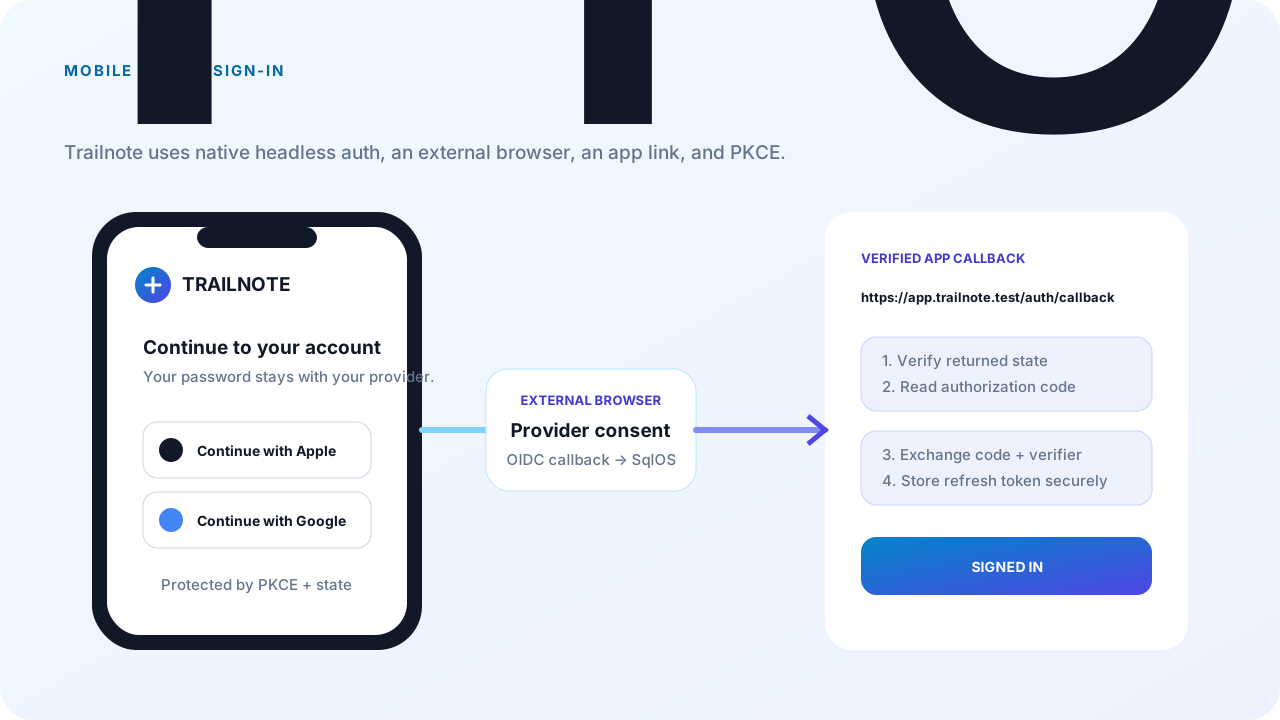
This guide extends Trailnote, a fictional iOS and Android app, with Google and Apple sign-in. Trailnote starts a SqlOS headless authorization request, opens the provider in a system authentication session, returns through a verified app link, and exchanges the resulting authorization code with PKCE.
The app does not use Google or Apple native sign-in SDKs. It opens the provider URL returned by SqlOS in ASWebAuthenticationSession, Chrome Custom Tabs, or an equivalent system authentication session.
| Callback | Registered with | Example |
|---|---|---|
| Provider callback | Google and Apple | https://identity.trailnote.test/sqlos/auth/oidc/callback |
| App callback | SqlOS client | https://app.trailnote.test/auth/callback |
The provider always returns to the public SqlOS host. SqlOS validates the provider response and then returns its own authorization code to the app callback. Never register a custom app scheme as the provider callback.
Provider credentials remain on the server. PublicOrigin must describe the externally reachable HTTPS origin, including when the app is behind a reverse proxy.
const string publicOrigin = "https://identity.trailnote.test";
const string providerCallback =
    $"{publicOrigin}/sqlos/auth/oidc/callback";

builder.AddSqlOS<AppDbContext>(options =>
{
    var auth = options.AuthServer;
    auth.PublicOrigin = publicOrigin;
    auth.Issuer = $"{publicOrigin}/sqlos/auth";

    auth.SeedGoogleConnection(
        builder.Configuration["SqlOS:Oidc:Google:ClientId"]!,
        builder.Configuration["SqlOS:Oidc:Google:ClientSecret"]!,
        providerCallback);

    auth.SeedOidcConnection(apple =>
    {
        apple.ProviderType = SqlOSOidcProviderType.Apple;
        apple.DisplayName = "Apple";
        apple.ClientId = builder.Configuration["SqlOS:Oidc:Apple:ServicesId"]!;
        apple.AllowedCallbackUris = [providerCallback];
        apple.AppleTeamId = builder.Configuration["SqlOS:Oidc:Apple:TeamId"];
        apple.AppleKeyId = builder.Configuration["SqlOS:Oidc:Apple:KeyId"];
        apple.ApplePrivateKeyPem =
            builder.Configuration["SqlOS:Oidc:Apple:PrivateKeyPem"];
    });
});
Register providerCallback exactly in each provider console. Apple uses a form_post callback; SqlOS accepts both GET and POST at the shared callback route.
Use a claimed HTTPS universal/app link in production. Keep a custom scheme only as a development fallback if your mobile framework needs one:
options.AuthServer.SeedClient(client =>
{
    client.ClientId = "trailnote-mobile";
    client.Name = "Trailnote Mobile";
    client.Audience = "https://api.trailnote.test";
    client.RedirectUris =
    [
        "https://app.trailnote.test/auth/callback",
        "trailnote://auth/callback"
    ];
    client.AllowedScopes = ["openid", "profile", "email", "offline_access"];
    client.ClientType = "public_pkce";
    client.RequirePkce = true;
    client.IsFirstParty = true;
    client.AllowNativeHeadlessAuth = true;
});
Native headless auth accepts only a first-party public_pkce client with PKCE required, an exact registered redirect URI, and AllowNativeHeadlessAuth = true.
Configure the iOS associated domain and Android App Link for app.trailnote.test. Test that the operating system opens the installed app for the exact callback and that an unclaimed host stays in the browser.
Drive the native flow with @sqlos/headless. Pass PKCE into flow.start so the app still holds the verifier for the later /token exchange. Do not call /sqlos/auth/headless from application fetch helpers.
import { createHeadlessFlow, generatePkce, randomState } from "@sqlos/headless";
import { useHeadlessAuth } from "@sqlos/headless/react-native";
import { exchangeCodeAsync } from "expo-auth-session";

const issuer = "https://identity.trailnote.test/sqlos/auth";
const clientId = "trailnote-mobile";
const redirectUri = "https://app.trailnote.test/auth/callback";

// Expo: createPkceGenerator({ randomBytes, sha256 }) with expo-crypto primitives
// when Web Crypto subtle is unavailable — see the package reference.
const pkce = await generatePkce();
const state = randomState();

const flow = createHeadlessFlow({
  issuer,
  clientId,
  redirectUri,
  generatePkce,
});

await flow.start({
  scope: "openid profile email offline_access",
  resource: "https://api.trailnote.test",
  view: "login",
  state,
  codeVerifier: pkce.codeVerifier,
  codeChallenge: pkce.codeChallenge,
  codeChallengeMethod: "S256",
});

if (flow.status === "error") {
  showError(flow.error, flow.fieldErrors);
}

const providers = flow.viewModel?.providers ?? [];
React Native snapshots:
const { flow, status, view, viewModel, error, fieldErrors, redirectUrl } =
  useHeadlessAuth({
    issuer,
    clientId,
    redirectUri,
    generatePkce,
  });
Omit credentials on native. Render provider buttons from viewModel.providers; do not hard-code database connection IDs into the app. Display name and optional logo come from the server configuration. See Build your own login and signup UI.
When the user chooses a provider, pass the returned connectionId back to SqlOS:
const google = providers.find((provider) => provider.providerType === "google");
if (!google) {
  showError("Google sign-in is not available.");
  return;
}

await flow.provider.start({ connectionId: google.connectionId });

if (flow.status === "error") {
  showError(flow.error, flow.fieldErrors);
  return;
}

if (flow.status !== "redirect" || !flow.redirectUrl || flow.authorization) {
  render(flow.viewModel);
  return;
}

const callbackUrl = await openSystemAuthenticationSession(
  flow.redirectUrl,
  redirectUri,
);
status === "redirect" with a null authorization is an external IdP URL — follow it; do not treat it as a code callback. openSystemAuthenticationSession represents the platform API or framework wrapper around a system browser auth session. Do not render provider credentials in an embedded WebView.
The browser sequence is:
SqlOS validates a separate provider state, nonce, and internal PKCE transaction before step 4. The app still must validate its original outer state.
The system session returns the registered app callback. Validate it, then let expo-auth-session call /token. The package never calls /token.
const callback = new URL(callbackUrl);
if (
  callback.origin !== "https://app.trailnote.test"
  || callback.pathname !== "/auth/callback"
) {
  throw new Error("Unexpected sign-in callback URL.");
}

if (callback.searchParams.get("state") !== state) {
  throw new Error("The sign-in state did not match.");
}

const code = callback.searchParams.get("code");
if (!code) {
  throw new Error(callback.searchParams.get("error") ?? "No authorization code returned.");
}

const tokens = await exchangeCodeAsync(
  {
    clientId,
    code,
    redirectUri,
    extraParams: {
      code_verifier: pkce.codeVerifier,
      resource: "https://api.trailnote.test",
    },
  },
  { tokenEndpoint: `${issuer}/token` },
);
The app receives SqlOS access and refresh tokens, not the provider's tokens or an ID token. Store the refresh token in Keychain/Keystore-backed storage. Clear the verifier, state, request ID, callback URL, and authorization code after exchange.
Trailnote presents native provider buttons, hands credential entry to a trusted system browser, returns through a verified app link, and finishes a normal SqlOS authorization-code flow with PKCE. Provider secrets and provider tokens never enter the app.