Guides
Require Authenticator MFA
Enable TOTP, let users self-enroll, and require MFA for a tenant.
This guide enables authenticator-app MFA and tests both voluntary enrollment and forced organization policy.
You will configure SqlOS so:
Keep the first version optional unless your product needs an immediate tenant-wide requirement.
builder.AddSqlOS<AppDbContext>(options =>
{
    options.AuthServer.ConfigureMfa(mfa =>
    {
        mfa.Enabled = true;
        mfa.AllowUserSelfEnrollmentByDefault = true;
        mfa.RecoveryCodesEnabledByDefault = true;
        mfa.RequireForAllUsersByDefault = false;
        mfa.Totp.Issuer = "Acme";
    });
});
To let configuration own the value across restarts, seed the policy:
builder.AddSqlOS<AppDbContext>(options =>
{
    options.AuthServer.SeedMfaPolicy(mfa =>
    {
        mfa.Enabled = true;
        mfa.TotpEnabled = true;
        mfa.UserSelfEnrollmentEnabled = true;
        mfa.RecoveryCodesEnabled = true;
        mfa.RequireForAllUsers = false;
    });
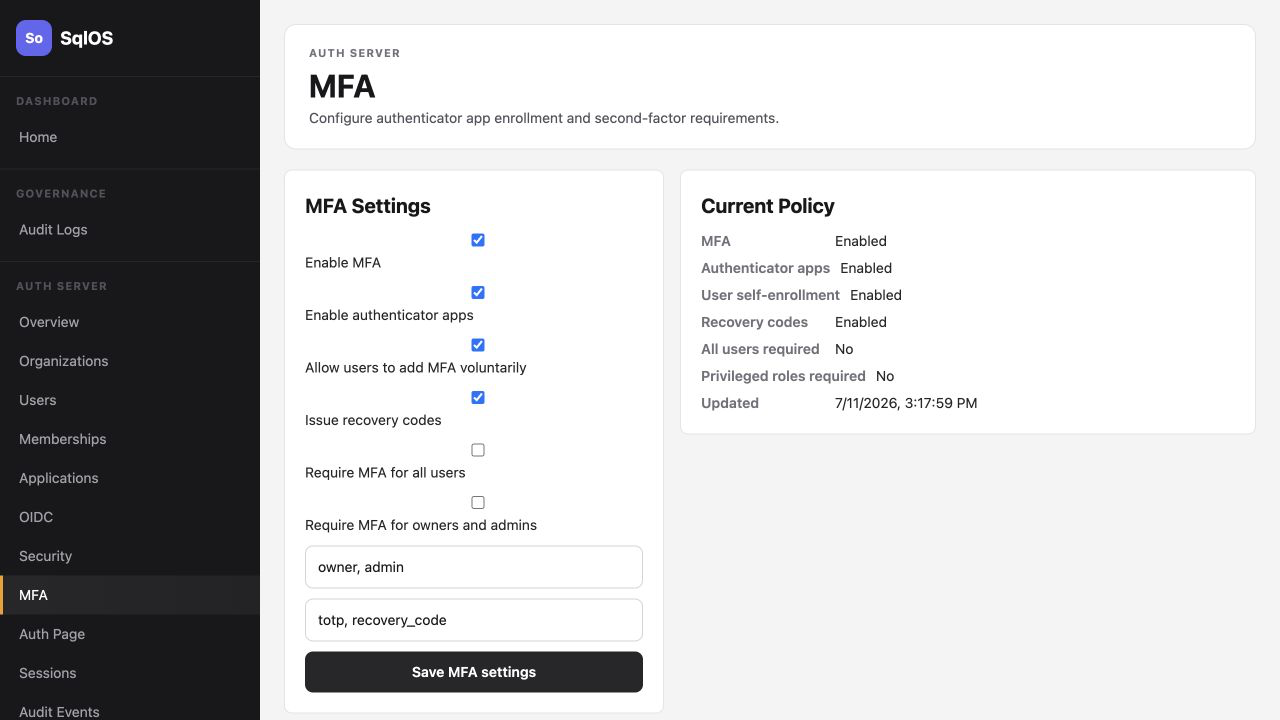
});Open /sqlos/admin/auth/ and go to MFA.
Confirm:
If the screen says the values are startup managed, changes made in the dashboard are overwritten on restart.
Use the organization policy API when one tenant requires MFA:
curl -X PUT http://localhost:5062/sqlos/admin/auth/api/organizations/org_123/mfa-policy \
  -b "$SQLOS_DASHBOARD_COOKIE_JAR" \
  -H "Content-Type: application/json" \
  -d '{
    "isEnabled": true,
    "requireMfaForAllUsers": true,
    "requireMfaForOwnersAndAdmins": false,
    "userSelfEnrollmentEnabled": true,
    "recoveryCodesEnabled": true,
    "requiredRoles": ["owner", "admin"],
    "availableFactors": ["totp", "recovery_code"]
  }'
PUT replaces the whole organization policy, so keep the enrollment and recovery fields in the payload. The route also requires an operator session.
Use requireMfaForOwnersAndAdmins instead when only privileged tenant roles need MFA.
Expose app endpoints that call SqlOSAuthService, but put them behind bearer-token validation first. The audience must be the exact API audience registered for this resource server. After validation, take the user and organization IDs from GetSqlOSValidatedToken(); never accept either ID from the request body.
using SqlOS.AuthServer.Extensions;
using SqlOS.Extensions;

const string apiAudience = "https://api.acme.test";

var api = app.MapGroup("/api")
    .RequireSqlOSAccessToken(apiAudience);

api.MapGet("/mfa/status", async (
    SqlOSAuthService authService,
    HttpContext http,
    CancellationToken ct) =>
{
    var token = http.GetSqlOSValidatedToken();
    if (string.IsNullOrWhiteSpace(token?.UserId))
        return Results.Unauthorized();

    return Results.Ok(await authService.GetMfaStatusAsync(
        token.UserId,
        token.OrganizationId,
        ct));
});

api.MapPost("/mfa/totp/enroll/start", async (
    SqlOSTotpEnrollmentStartRequest request,
    SqlOSAuthService authService,
    HttpContext http,
    CancellationToken ct) =>
{
    var token = http.GetSqlOSValidatedToken();
    if (string.IsNullOrWhiteSpace(token?.UserId))
        return Results.Unauthorized();

    return Results.Ok(await authService.StartTotpEnrollmentAsync(
        token.UserId,
        request,
        token.OrganizationId,
        ct));
});

api.MapPost("/mfa/totp/enroll/verify", async (
    SqlOSTotpEnrollmentVerifyRequest request,
    SqlOSAuthService authService,
    HttpContext http,
    CancellationToken ct) =>
{
    var token = http.GetSqlOSValidatedToken();
    if (string.IsNullOrWhiteSpace(token?.UserId))
        return Results.Unauthorized();

    // Self-enrollment never accepts a login-time MFA challenge token.
    var selfEnrollment = new SqlOSTotpEnrollmentVerifyRequest(
        request.EnrollmentToken,
        request.Code);

    return Results.Ok(await authService.VerifyTotpEnrollmentAsync(selfEnrollment, http, ct));
});
RequireSqlOSAccessToken rejects missing, invalid, expired, revoked, or wrong-audience tokens before any enrollment handler runs. If your host already uses ASP.NET Core authentication instead, apply an equivalent authorization policy that validates the exact audience and active SqlOS session.
Render qrCodeDataUrl as an image, keep secret available for manual setup, and verify the 6-digit TOTP code with the server-minted enrollment token returned by the authenticated start call. Show recovery codes once after verification.
Hosted auth handles this automatically.
For headless auth, render these view names:
| View | UI |
|---|---|
mfa | Code input for authenticator code or recovery code |
mfa-enroll | QR code, manual setup secret, and TOTP verification input |
Post the challenge code:
POST /sqlos/auth/headless/mfa/verify
{
  "requestId": "req_123",
  "mfaToken": "tmp_...",
  "code": "123456"
}
Post forced enrollment verification:
POST /sqlos/auth/headless/mfa/totp/enroll/verify
{
  "requestId": "req_123",
  "mfaToken": "tmp_...",
  "enrollmentToken": "tmp_...",
  "code": "123456"
}The example stack includes both optional self-enrollment and a seeded Retail org that requires MFA.
dotnet run --project examples/SqlOS.Example.AppHost/SqlOS.Example.AppHost.csprojThen:
http://localhost:3010./retail/account.Two-step verification.admin@retail.demo with RetailDemo1!. Expect forced authenticator enrollment before entering the app.requiresMfa or requiresMfaEnrollment as the next auth state and post the MFA step back to SqlOS. Tokens are intentionally absent until SqlOS completes the second factor.mfa and mfa-enroll in headless UIs.