OAuth for MCP clients
Protect an MCP server with discovery, PKCE, portable client metadata, and a resource-bound audience.
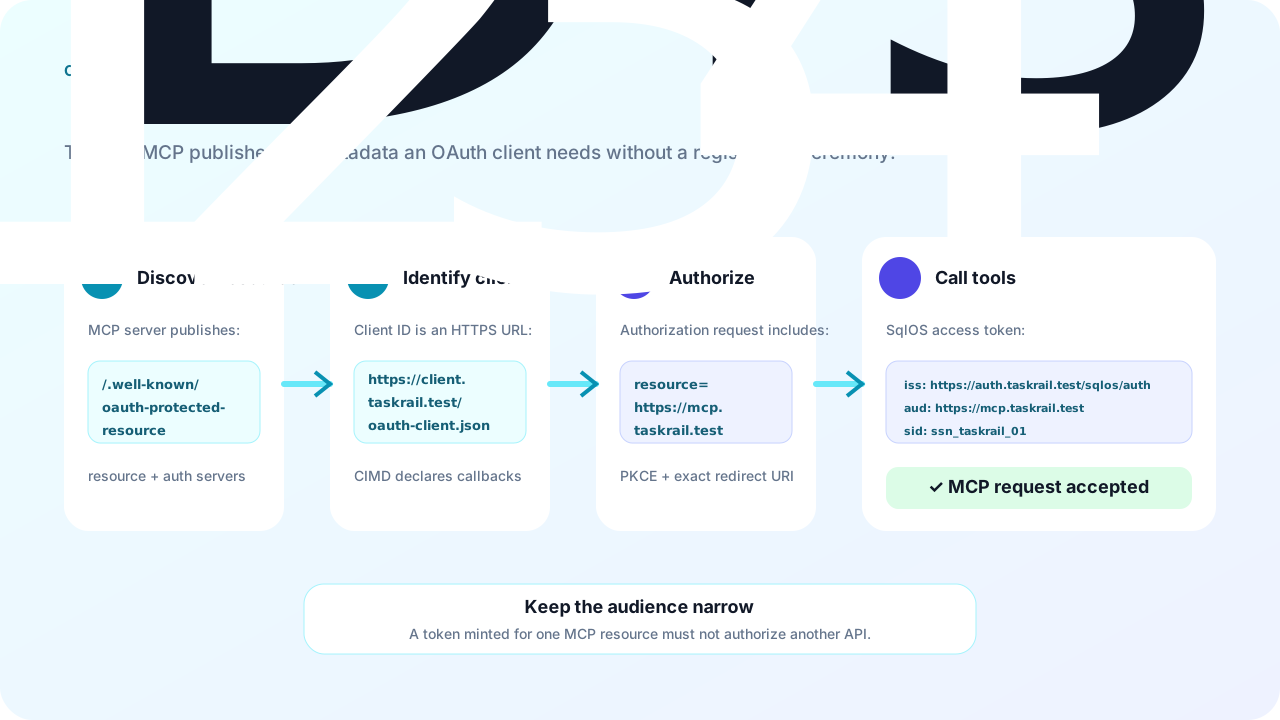
This guide builds Taskrail, a fictional MCP server at https://mcp.taskrail.test. A portable client identifies itself with a metadata document, completes authorization code with PKCE, and receives a SqlOS access token whose aud is exactly the Taskrail MCP resource.
When the MCP server lives in the same host as SqlOS, set app.Mcp = "/mcp" inside UseSingleApplication or ConfigureApplication. SqlOS then serves the protected-resource document, registers scheme/policy SqlOS.Mcp with that audience, and enables CIMD and resource indicators. Map Microsoft's MCP SDK with AddMcpServer / MapMcp and lock it with RequireAuthorization("SqlOS.Mcp"). See MCP server. This guide covers the explicit, multi-client setup where the authorization server and the MCP resource are separate deployments.
If you own both the client and server, preregister a public PKCE client with SeedClient first. Use CIMD only when a stable HTTPS client identity must work across multiple authorization-server deployments.
MCP client
  ├─ GET https://mcp.taskrail.test/.well-known/oauth-protected-resource
  ├─ GET https://auth.taskrail.test/sqlos/auth/.well-known/oauth-authorization-server
  ├─ GET https://client.taskrail.test/oauth-client.json       (CIMD)
  ├─ GET https://auth.taskrail.test/sqlos/auth/authorize       (state + PKCE + resource)
  ├─ POST https://auth.taskrail.test/sqlos/auth/token          (code + verifier + resource)
  └─ POST https://mcp.taskrail.test/mcp                        (Bearer access token)
There are three independently verified identities:
This is a dedicated identity host. The MCP server is on another origin, so this app does not declare Api or Mcp. app.Origin is the public auth origin; SqlOS derives the issuer as {Origin}/sqlos/auth. Portable clients need CIMD on, which is off until you set it. Resource indicators stay on by default outside UseSingleApplication.
const string origin = "https://auth.taskrail.test";

builder.AddSqlOS<AppDbContext>(
    db => db.UseSqlServer(connectionString),
    options =>
    {
        options.ConfigureApplication("Taskrail", app =>
        {
            app.Origin = origin;
        });

        var cimd = options.AuthServer.ClientRegistration.Cimd;
        cimd.Enabled = true;
        cimd.TrustedHosts.Add("client.taskrail.test");
        cimd.HttpTimeout = TimeSpan.FromSeconds(5);
        cimd.MaxMetadataBytes = 32 * 1024;
    });
Discovery then advertises CIMD, the resource parameter, S256, and public clients with token_endpoint_auth_method=none. Same-host apps that set app.Mcp = "/mcp" get CIMD and resource indicators from that assignment and do not repeat these flags. See MCP server.
TrustedHosts is an allowlist checked before SqlOS requests the metadata URL. When it is empty, any syntactically valid HTTPS client-ID URL with a non-root path is eligible. SqlOS rejects mixed public/private DNS answers and does not follow redirects. Still enforce DNS/IP and HTTPS egress at the network or HttpClient layer. If you cannot, seed a client instead of using CIMD.
The MCP server owns this document. It tells a client which resource string to request and which issuer can authorize it. (Single-application hosts with Api/Mcp declared get it served by SqlOS at /.well-known/oauth-protected-resource and /.well-known/oauth-protected-resource{Mcp}.)
using System.Text.Json;

const string resource = "https://mcp.taskrail.test";
const string issuer = "https://auth.taskrail.test/sqlos/auth";
const string resourceMetadata =
    "https://mcp.taskrail.test/.well-known/oauth-protected-resource";

app.MapGet("/.well-known/oauth-protected-resource", () =>
{
    var document = new Dictionary<string, object?>
    {
        ["resource"] = resource,
        ["authorization_servers"] = new[] { issuer },
        ["scopes_supported"] = new[]
        {
            "openid", "profile", "offline_access", "tasks.read", "tasks.write"
        },
        ["bearer_methods_supported"] = new[] { "header" },
        ["resource_documentation"] = "https://docs.taskrail.test/mcp"
    };

    return Results.Text(JsonSerializer.Serialize(document), "application/json");
});
An unauthenticated MCP request should receive a bearer challenge that points back to this URL. On a SqlOS host, set app.Mcp = "/mcp" and call RequireAuthorization("SqlOS.Mcp") on MapMcp so the MCP scheme emits that challenge. On a host that only calls ValidateAccessTokenAsync, write the same WWW-Authenticate Bearer challenge yourself when validation fails.
The client hosts this JSON at its stable HTTPS client_id:
{
  "client_id": "https://client.taskrail.test/oauth-client.json",
  "client_name": "Taskrail Desktop",
  "description": "Portable public MCP client",
  "redirect_uris": ["https://client.taskrail.test/oauth/callback"],
  "grant_types": ["authorization_code", "refresh_token"],
  "response_types": ["code"],
  "token_endpoint_auth_method": "none",
  "scope": "openid profile offline_access tasks.read tasks.write",
  "client_uri": "https://client.taskrail.test"
}
The document URL and client_id value must match exactly. SqlOS also requires HTTPS with a non-root path, at least one redirect URI, authorization code, response type code, and no token-endpoint client secret.
Serve the file as JSON with conservative caching. Changing redirect URIs, auth method, grant types, or response types causes SqlOS to revoke active sessions when it refreshes the cached metadata.
Desktop and CLI clients (ChatGPT desktop / Codex, for example) register a portless loopback redirect such as http://127.0.0.1/callback/<id> and bind an ephemeral port at login. Per RFC 8252 §7.3, SqlOS accepts any port on a loopback IP-literal redirect (127.0.0.1 or [::1]) while still requiring the scheme, address, path, and query to match the registered URI exactly. This applies only to loopback IP literals — localhost, HTTPS, and every other redirect URI require an exact match — and only while ClientRegistration.Dcr.AllowLoopbackRedirectUris is enabled (the default).
The client generates a cryptographically random state and PKCE verifier, then hashes the verifier with S256:
GET https://auth.taskrail.test/sqlos/auth/authorize?
  response_type=code&
  client_id=https%3A%2F%2Fclient.taskrail.test%2Foauth-client.json&
  redirect_uri=https%3A%2F%2Fclient.taskrail.test%2Foauth%2Fcallback&
  scope=openid%20profile%20offline_access%20tasks.read%20tasks.write&
  state=<random-state>&
  code_challenge=<s256-challenge>&
  code_challenge_method=S256&
  resource=https%3A%2F%2Fmcp.taskrail.test
After sign-in and authorization, validate state at the exact registered callback before reading the authorization code. Public clients have no client secret; PKCE binds the code exchange to the process that started it. SqlOS shows a per-user consent screen for non-first-party clients — including CIMD and DCR clients — before issuing their first authorization code; TrustedHosts/TrustPolicy remain operator admission controls, and FGA or app policy remains the authorization boundary.
Repeat the same client ID, redirect URI, and resource at the token endpoint:
POST https://auth.taskrail.test/sqlos/auth/token
Content-Type: application/x-www-form-urlencoded

grant_type=authorization_code
&client_id=https%3A%2F%2Fclient.taskrail.test%2Foauth-client.json
&redirect_uri=https%3A%2F%2Fclient.taskrail.test%2Foauth%2Fcallback
&code=<authorization-code>
&code_verifier=<original-verifier>
&resource=https%3A%2F%2Fmcp.taskrail.test
The token response returns access_token, refresh_token, token_type, expires_in, and scope. The JWT access token contains the SqlOS identity/session claims and:
{
  "iss": "https://auth.taskrail.test/sqlos/auth",
  "aud": "https://mcp.taskrail.test",
  "client_id": "https://client.taskrail.test/oauth-client.json",
  "scope": "tasks.read"
}
The scope claim is the granted scope — the requested set already intersected with the client's allowlist — and records the MCP client's delegation ceiling, which the resource server may inspect on the validated token. It is a client grant, not a per-user authorization decision: never authorize an MCP tool from scope alone. See Scopes and Permissions.
Audience validation proves that the token was minted for Taskrail. It does not grant access to every tool or task. Resolve the actor from the validated token, then apply FGA or app policy:
mcp.MapPost("/", async (
    HttpContext http,
    McpRequest request,
    ISqlOSFgaAuthService fga,
    CancellationToken ct) =>
{
    var token = http.GetSqlOSValidatedToken();
    var userId = token?.UserId;
    if (string.IsNullOrWhiteSpace(userId))
        return Results.Unauthorized();
    var organizationId = token!.OrganizationId;

    McpAuthorizationTarget? target;
    switch (request.Method)
    {
        case "initialize":
        case "notifications/initialized":
        case "ping":
            target = new McpAuthorizationTarget(null, null);
            break;

        case "tools/list" when organizationId is not null:
            target = new McpAuthorizationTarget(
                "TASK_READ",
                $"workspace::{organizationId}");
            break;

        case "tools/call":
            var toolCall = dispatcher.ParseToolCall(request);
            target = toolCall.Name switch
            {
                "tasks.list" when organizationId is not null =>
                    new McpAuthorizationTarget(
                        "TASK_READ",
                        $"workspace::{organizationId}"),
                "tasks.update" =>
                    new McpAuthorizationTarget(
                        "TASK_WRITE",
                        await taskResources.ResolveResourceIdAsync(toolCall, ct)),
                _ => null
            };
            break;

        default:
            target = null;
            break;
    }

    // Default-deny methods, tools, resources, and prompts not enumerated above.
    if (target is null)
        return Results.Forbid();

    if (target.Permission is not null && target.ResourceId is not null)
    {
        var decision = await fga.CheckAccessAsync(
            userId,
            target.Permission,
            target.ResourceId);

        if (!decision.Allowed)
            return Results.Forbid();
    }

    return await dispatcher.DispatchAsync(request, userId, ct);
});

public sealed record McpAuthorizationTarget(
    string? Permission,
    string? ResourceId);
Never accept a user or subject ID from MCP arguments as the acting identity. Derive it from GetSqlOSValidatedToken(). Enumerate every supported tools/*, resources/*, and prompts/* operation in the policy, resolve protected targets from validated arguments on the server, and keep the default branch denied.
aud names another API.resource from authorization.403.state.client_id or callback is rejected.resource_metadata bearer challenge without leaking account or assignment details.Authorization-code processing currently accepts a non-empty resource and binds the resulting token to it. The MCP server's exact ExpectedAudience is therefore the enforcement boundary. Do not describe the client's configured audience as an authorization-code resource allowlist.
Taskrail clients can discover the authorization server, identify a portable public client, complete PKCE, and call the MCP endpoint with a token accepted only by https://mcp.taskrail.test. Tool access still requires an explicit authorization decision.