Add SqlOS to one app
Embed hosted authentication in an ASP.NET Core app with UseSingleApplication.
Start an ASP.NET Core application with:
/api surface;net9.0;SqlOS 7.2.1 targets net9.0; it is not compatible with a net8.0 host.
dotnet add package SqlOS --version 7.2.1For a new project, store local values with user secrets:
dotnet user-secrets init
dotnet user-secrets set "ConnectionStrings:DefaultConnection" "Server=localhost,1433;Database=Acme;User Id=sa;Password=<your-password>;Encrypt=True;TrustServerCertificate=True"
dotnet user-secrets set "SqlOS:Dashboard:Password" "<a-long-random-password>"
The database must already exist. SqlOS creates and upgrades its own tables inside it.
Replace Program.cs with:
using Microsoft.EntityFrameworkCore;
using SqlOS;
using SqlOS.AuthServer.Extensions;
using SqlOS.Configuration;
using SqlOS.Extensions;

var builder = WebApplication.CreateBuilder(args);

var connectionString = builder.Configuration.GetConnectionString("DefaultConnection")
    ?? throw new InvalidOperationException(
        "Connection string 'DefaultConnection' was not configured.");

const string publicOrigin = "http://localhost:5050";
var dashboardPassword = builder.Configuration["SqlOS:Dashboard:Password"]
    ?? throw new InvalidOperationException(
        "Configure SqlOS:Dashboard:Password with user secrets or your secret store.");
builder.AddSqlOS<AppDbContext>(
    db => db.UseSqlServer(connectionString), // or db.UseNpgsql(connectionString)
    options =>
    {
        options.UseSingleApplication("Acme", app =>
        {
            app.Origin = publicOrigin;                              // issuer, callback, audiences derive from this
            app.ClientId = "acme-web";
            app.Api = "/api";                                       // resource id {Origin}/api — scheme audience + PRM
            app.Brand(page => page.PrimaryColor = "#0f172a");       // hosted sign-in pages
            // app.Headless("/auth/authorize");                     // ...or your own sign-in UI instead
            // app.Mcp = "/mcp";                                   // resource id {Origin}/mcp — map the MCP SDK yourself
            // app.Authorization(fga => ...);                       // permission model, when you need row-level rules
        });

        options.Dashboard.AuthMode = SqlOSDashboardAuthMode.Password;
        options.Dashboard.Password = dashboardPassword;
    });

var app = builder.Build();

app.MapGet("/", () => Results.Ok(new { sqlos = "ready" }));
app.MapGet("/api/me", (HttpContext http) => http.GetSqlOSValidatedToken()!.UserId)
    .RequireAuthorization();

app.Run();

public sealed class AppDbContext(DbContextOptions<AppDbContext> options)
    : SqlOSDbContext<AppDbContext>(options)
{
}
SqlOSDbContext<TContext> registers the AuthServer, calendar, email, and FGA EF models. UseSingleApplication creates the application seed, AuthPage branding, and the {Origin}/api resource id without exposing client-registration terminology in the common path. Lock /api/me with RequireAuthorization(). Every line inside app => { … } except Origin is optional; the full option table is on Getting started.
The hosted login, signup, OTP, MFA, and consent pages are the default. If your product must own those screens, uncomment app.Headless("/auth/authorize"): SqlOS then redirects browser interaction to your page at {Origin}/auth/authorize with the standard request, view, email, pendingToken, and mfaToken parameters, and your frontend drives the flow with @sqlos/headless. Nothing else in this file changes. See Build your own login UI.
The example explicitly reads the dashboard password from builder.Configuration and assigns it to options.Dashboard.Password. Merely adding SqlOS:Dashboard:Password to configuration does not configure SqlOS unless your callback reads and assigns it.
Use the same origin declared in the code:
dotnet run --urls http://localhost:5050On the first start, SqlOS creates or upgrades its schema, automatically protects its signing key, writes default settings, and reconciles the acme-web application seed.
Check the application:
curl http://localhost:5050/Check OAuth metadata:
curl http://localhost:5050/sqlos/auth/.well-known/oauth-authorization-serverOpen http://localhost:5050/sqlos, enter the configured dashboard password, then confirm:
acme-web;http://localhost:5050/auth/callback;http://localhost:5050/api.Check the protected surface: curl -i http://localhost:5050/api/me returns 401 with a WWW-Authenticate: Bearer challenge that names http://localhost:5050/.well-known/oauth-protected-resource.
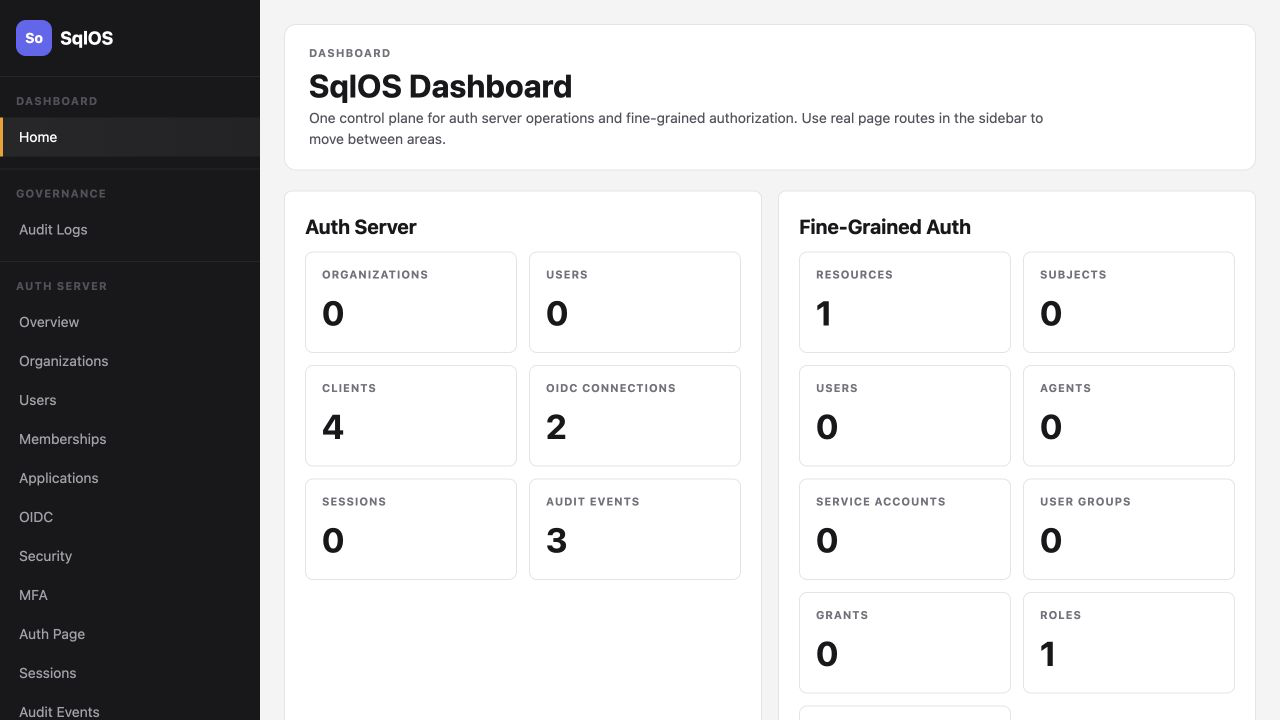
This host now owns the auth server surfaces. Your browser application still needs a standard authorization-code-with-PKCE callback. Continue with the ASP.NET Core login quickstart for a complete framework-owned callback and application session.
That runnable client uses /signin-sqlos, the conventional ASP.NET Core middleware callback. When adapting it to this host, either change app.RedirectPath above to /signin-sqlos or set the OpenID Connect handler's CallbackPath to /auth/callback. The seeded redirect URI and middleware callback must match exactly.
Invalid SqlOS configuration at startup#In single-application local development, SqlOS derives the issuer from app.Origin when the issuer is otherwise left at its default. For production or multi-application deployments, configure one stable issuer; set PublicOrigin during production readiness when you need to make that external origin explicit. PublicOrigin must be an absolute origin without a path, query, or fragment, and the issuer must be exactly {PublicOrigin}/sqlos/auth when it is set.
SqlOS initializes tables, not the SQL Server or PostgreSQL database itself. Create the database and grant the application login the required DDL access before starting the host.
Confirm the configuration key is available to this process and that the options callback assigns it. User secrets apply only to the project in which they were initialized.
The requested callback must exactly equal the seeded URI, including scheme, host, port, and path. Change publicOrigin and RedirectPath together.
Single-application mode will not overwrite an unrelated manual client. Pick a different ClientId or remove the conflicting development record deliberately.
/sqlos and /sqlos/admin at the network or identity-aware proxy layer; the built-in password is a baseline, not the only control for a public admin endpoint.